

Samsung Galaxy A53 5G SM-A536B/DS Hard Reset / Factory Reset – Remove Pattern Lock/Password

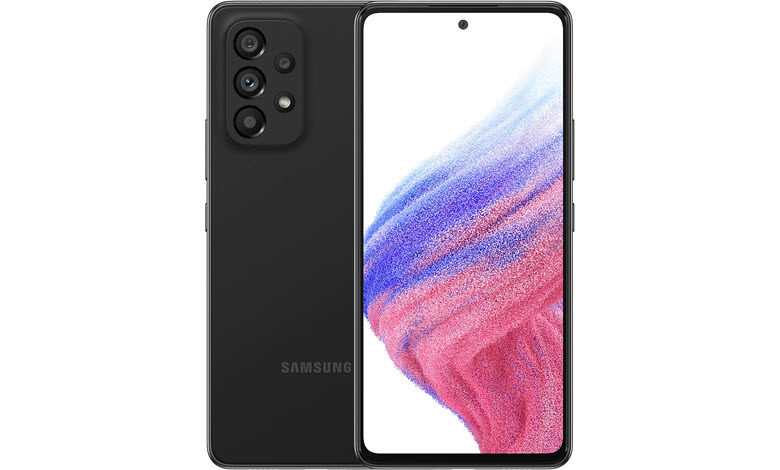
Does your smartphone become slow? Does it hang? Do you want to reset it to restore its speed to the same level as when you bought your smartphone? Is there an ‘Insufficient Storage’ error on your smartphone? Have you forgotten your lock screen password? In this tutorial, we will guide you on How to reset/ factory reset Samsung Galaxy A53 5G SM-A536B/DS?
How to bypass screen lock/ password in Samsung Galaxy A53 5G SM-A536B/DS? (Bypassing screen lock becomes necessary when a user forgets the lock screen password or wants to remove pattern lock and wants to bypass the same.). Apart from this, we will also learn How to restore defaults on Samsung Galaxy A53 5G SM-A536B/DS? How to wipe all data in Samsung Galaxy A53 5G SM-A536B/DS?
Table of Contents
Introduction – What is Reset?
With time, smartphones are becoming more assertive, fast, and more powerful than ever before. Thanks to the powerful hardware, which has brought an evolution in the smartphone industry. But there are a few problems, which exists since anticipation. Sometimes, we are unsure about certain features specific to our device. With time, smartphones usually become slow, and then we need to reset them. In this guide, we have provided solutions for slower devices, whether they hang or get slow, bypass the lock screen password protection, or in case an ‘insufficient storage’ error appears on the screen and storage becomes full. Sometimes one needs to reset the device when they want to give the device to someone in the family or sell it, and want that nobody should be able to access files and passwords.
In the following tutorial, we explained in detail how to master format/ reset Samsung Galaxy A53 5G SM-A536B/DS and make it as smooth and fast as you bought on the first day out of the store.
Caution: You must remember that Factory Reset/ Reset returns the device to the original factory state, like when you bought your device. Resetting your device deletes all the multimedia content and user files on your device, i.e., Apps including Data; apart from that comes pre-installed, Images, Documents, Audio Files, Video Files, and everything else stored in the internal storage of your device. We strongly recommend you back up your data before the reset so you won’t lose any critical, required data.
About Samsung Galaxy A53 5G SM-A536B/DS
The Samsung Galaxy A53 5G gets the specifications:




Model Numbers: SM-A536B, SM-A536B/DS, SM-A536U, SM-A536U1, SM-A5360, SM-A536E, SM-A536E/DS, SM-A536V
Chipset: Exynos 1280 (5 nm)
CPU: Octa-core (2×2.4 GHz Cortex-A78 & 6×2.0 GHz Cortex-A55)
GPU: Mali-G68
OS: Android 12, One UI 4.1
Internal: 128GB 4GB RAM, 128GB 6GB RAM, 128GB 8GB RAM, 256GB 6GB RAM, 256GB 8GB RAM
Camera: Quad Camera Sensor / 64 MP, f/1.8, 26mm (wide), 1/1.7X”, 0.8µm, PDAF, OIS / 12 MP, f/2.2, 123˚ (ultrawide), 1.12µm / 5 MP, f/2.4, (macro) / 5 MP, f/2.4, (depth)
Display: 6.5 inches, 102.0 cm2 (~85.4% screen-to-body ratio), Super AMOLED, 120Hz, 800 nits (HBM), 1080 x 2400 pixels, 20:9 ratio (~405 ppi density), Corning Gorilla Glass 5
Battery: Li-Po 5000 mAh, non-removable, Fast charging 25W
Now, let us move on to the procedures to reset Samsung Galaxy A53 5G SM-A536B/DS. There are two ways: the first is through Settings/ Options, and the second way, we have to boot the device into the recovery mode. Though we suggest, you go through the recovery mode option, which is more effective since it cleans up the device while the Android OS is not accessing the cache files and the device is in turned off condition and running in recovery mode.
Before You Begin – Prerequisites
- Make sure your device Samsung Galaxy A53 5G SM-A536B/DS is turned on and accessible.
- Check the battery charging level of your device; ensure that the device’s battery is charged to at least 75%, as it might take up to 1 hour to complete the process. If there is less than 50% power remaining on the battery, keeping the device plugged in a while performing the reset operation is suggested.
- Back up everything on your device! Make sure to back up your device, as the process removes all personal information and files.
- We recommend removing the microSD/ memory card before the factory reset.
- The process mentioned in this article applies to almost all the devices made by various manufacturers. The process supports various Operating System (OS)/ User Interface (UI) variants, but the key combinations/ things may be slightly different based on the smartphone model of the brand.
Part 1: Methods for Factory Reset (Hard Reset) Samsung Galaxy A53 5G SM-A536B/DS
Method 1: Factory Reset Samsung Galaxy A53 5G SM-A536B/DS from Settings – Normal Mode
Before You Begin – Things to Check
Each Android Device might have different key combinations based on each manufacturer and UI/ Operating System customization. So, things may be slightly different on your particular tablet or smartphone model.
Ensure to remove any microSD card/memory cards before proceeding with resetting the device.
It can take an hour or more for the reset to complete. Make sure your device Samsung Galaxy A53 5G SM-A536B/DS is charged — ideally, it’s best to leave it plugged in during the reset process.
Step 1: First of all, navigate to Settings with a cogwheel icon, and then scroll down to the bottom and select System to continue, where you can configure Language, Time, Backup, and system updates.


Step 2: Then, navigate to the About Phone/ Advanced menu, which displays the advanced option and about operating system information of your device. Select Reset options, from where you can reset Network, apps, or Device completely.

Step 3: Now, select Erase all data (factory reset). The factory data reset will restore the device like it is bought just now out of the box.

Step 4: On the next screen, Select Reset Phone or Reset Tablet, located at the bottom of the screen.

Step 5: Then, on the next screen, you will be asked to confirm whether you’re sure that you want to reset the device or pressed it accidentally; select the option Erase Everything. You must be aware that it would delete all data from your phone, including backup copies stored on your device’s internal storage, and the process can’t be undone, including images, audio files, documents, contacts, and call logs, and would permanently erase other data. The process would not delete your uploaded data online, including Google Drive data, Facebook, Twitter, Instagram, etc.

Step 6: If there is no pattern lock or password set, the process should go smoothly. Otherwise, draw a screen pattern and enter the screen unlock password/ pin to continue. Now at this stage, the device would Reboot and show an ongoing progress screen indicating that the data is being erased.
Step 7: The Samsung Galaxy A53 5G SM-A536B/DS device would restart/ reboot once more following the operating system has finished wiping the entire data on the device, and it typically takes several minutes to boot up after reset. The interface would now show a screen similar to the one which appeared just after you purchased and unboxed your phone from the sales box.
Method 2: Factory Reset Samsung Galaxy A53 5G SM-A536B/DS – Hard Reset or Recovery Mode
The biggest drawback of the Android operating system is that, over time, Android devices become slower and frequently experience unpredictable slowdowns, glitches, and other problems. At that point, a fix must be found to get our device functioning again normally. Slowdowns might also be brought on by viruses; if virus scans and repairs are ineffective, the only option left is ‘Recovery Mode.’
Recovery Mode in Android enables devices to reboot as a fresh start without any virus or other issues that were previously causing the troubles. In recovery mode, we can access the Android device before the Android operating system itself is fully loaded. Recovery mode enables you to make the typically impossible changes while the device is running. We can get root access and restore the backup of the OS, which resets the device and deletes all user data.
Recovery Mode is not programmed as easily accessible by beginners. Recovery mode is designed for developers and is usually not required by beginner-level users or casual users. Though accessing the recovery mode can cause trouble for some, and if the same thing happens to you, reach your phone or tablet manufacturer for assistance.
Method 3: Factory Reset Samsung Galaxy A53 5G SM-A536B/DS from Recovery Mode
Accessing Recovery Mode requires the correct key combination, which can be different from the one written here. If default instructions presented here don’t work for your Samsung Galaxy A53 5G SM-A536B/DS device, then search the web for ‘Recovery mode,’ including the Make and Model, i.e., Samsung Galaxy A53 5G SM-A536B/DS.
Step 1: Press and hold the power button for a few seconds, then a menu will appear with options like Power Off and Restart. Select Power Off.

Step 2: Your device will now turn off. Now, it’s time to wait for 5-6 seconds.
Step 3: Use the Key Combination to enter Recovery mode and boot your device. Depending on your model, you can use Volume Down to highlight Recovery Mode and the Power button to select. The most common options include password entry and language selection to enter recovery mode. You must keep holding the below-mentioned key combinations together/ simultaneously for a few seconds, according to the Android version, until the manufacturer logo is displayed.
Here is the dedicated list of the most common key combinations of most Android devices:
- Samsung: Power + Home + Volume Up
- Nexus: Power + Volume Up + Volume Down
- LG: Power + Volume Down
- HTC: Power + Volume Down
- Motorola: Power + Home
- Sony: Power + Volume Up OR Volume Down
- Pixel: Power + Volume Down
- Huawei: Power + Volume Down
- Xiaomi: Power + Volume Up
- OnePlus: Power + Volume Down
Remember that your device must be in turned-off status while using these key combinations.
If your device is not listed in the above list, try each method from the list; many devices are similar to others. One key combination might work; others might not.
If you cannot boot your Samsung Galaxy A53 5G SM-A536B/DS into recovery mode following the above key combination, contact your device’s manufacturer for guidance.
Step 4: Your device should be in Recovery Mode now; as soon as the ‘Android splash screen’ with the manufacturer logo appears, release the Key combination keys, i.e., Power and Volume Down buttons.
Step 5: It is worth bearing in mind that once you enter into Recovery mode, the touch screen is mainly disabled by manufacturers. As stated above, only hardware key combinations would work. Use volume up and down keys, highlighting Wipe data/factory reset.
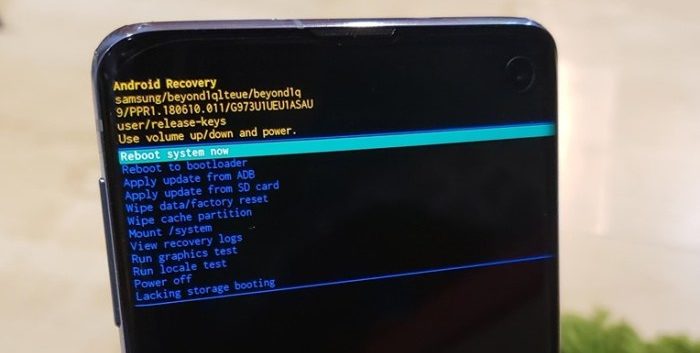
Step 6: Now, press the power button to select Wipe Cache Partition to clear the device cache.
Step 7: Use the volume keys and power button to select Wipe data/factory reset. Follow the onscreen prompts to complete the factory data reset of the device. Once the process finishes, your Samsung Galaxy A53 5G SM-A536B/DS device will automatically reboot. Once done, the device would take several minutes to boot while optimizing the pre-installed applications and operating system.
Method 4: Factory Reset Samsung Galaxy A53 5G SM-A536B/DS with Google Find My Device
Step 1: First of all, visit official Google My Device website.
Step 2: Now, its time to Sign in to your Google Account.
Step 3: After signing in, you will see three options Play Sound, Secure device & Erase device.
Step 4: Tap on the option Erase Device. This process will wipe all content, and user data in a few moments.
After the factory data reset, it’s time to set up your Android device like a new one. Hoping that the process went smoothly for you and that your Samsung Galaxy A53 5G SM-A536B/DS has been reset.
Part 2: Unlock Samsung Galaxy A53 5G SM-A536B/DS (Remove Pattern Lock/ Unlock Forgot Password)
What to do if you forget your password? or pin? And losing access to your phone because the lock screen is locked. This problem is a complete nightmare once the user can’t access his phone, but with this tutorial, one can unlock his phone using two methods.
Method 1: Unlock Samsung Galaxy A53 5G SM-A536B/DS with Answering Security Questions
This method is helpful if you want to unlock or reset the pattern password without data loss. But, this method is only helpful if you have set up a security question under the Google Security Settings.
Step 1: After several failed attempts, an option would appear on the screen: Forgot Pattern and Forgot PIN/Password on the device screen. Just tap on it.
Step 2: Now, tap on the option Answer Questions, then enter the answers to the security questions asked as per your inputs while signing up for Google Account.
Step 3: This will unlock your Samsung Galaxy A53 5G SM-A536B/DS device if you have given correct answers.
Step 4: Then, on the next screen, the interface will ask you whether (Yes or No) you want to create a New PIN, Password, or pattern lock password for your device; select the Yes option and create a password or pattern lock of your choice.
Method 2: Unlock Samsung Galaxy A53 5G SM-A536B/DS with Google Account
Step 1: Samsung Galaxy A53 5G SM-A536B/DS will display Forgot Pattern and Forgot PIN/Password options after multiple unsuccessful attempts.
Step 2: Just login/Sign in to your Google Account by entering your Username and Password.
Samsung Galaxy A53 5G SM-A536B/DS smartphone will be unlocked after successful sign-in, allowing you to create a new PIN/Password and Pattern lock.

Magnificent beat ! I would like to apprentice while you amend your website, how can i subscribe for a blog site?
The account helped me a acceptable deal. I had been a little bit acquainted of this your broadcast offered bright clear concept
Here is my page … คาสิโนเว็บตรงไม่ผ่านเอเย่นต์
Excellent post however , I was wondering if you could write
a litte more on this subject? I’d be very thankful if you could elaborate a little bit more.
Cheers!
Feel free to visit my web site: สมัคร bk8
I could not resist commenting. Perfectly written!
Check out my web blog … สมัคร ut9win
Write more, thats all I have to say. Literally, it seems as though you relied on the video to make your point.
You obviously know what youre talking about, why waste
your intelligence on just posting videos to your
site when you could be giving us something enlightening to read?
Howdy! This is my 1st comment here so I just wanted
to give a quick shout out and tell you I genuinely
enjoy reading your blog posts. Can you suggest any
other blogs/websites/forums that go over the same subjects?
Many thanks!
Also visit my page … ทางเข้า luckydays
I think that what you wrote was very logical. However, what about this?
what if you composed a catchier title? I mean, I don’t
want to tell you how to run your blog, but suppose you added a headline
to possibly grab a person’s attention? I mean Samsung Galaxy A53 5G
SM-A536B/DS Hard Reset / Factory Data Reset & Unlock is a little vanilla.
You might peek at Yahoo’s front page and note how they create
news titles to grab people to open the links. You might add a related video or a
picture or two to grab readers interested about what
you’ve got to say. In my opinion, it could make
your posts a little bit more interesting.
Here is my blog post :: สมัคร live casino house
My family every time say that I am killing my time here at
net, except I know I am getting experience daily by reading thes pleasant content.
Also visit my web blog ทางเข้า 77bet
Quality articles or reviews is the important to be a focus for the visitors
to visit the website, that’s what this website is providing.
Here is my blog post :: คาสิโนออนไลน์
Hi to every , because I am truly keen of reading this blog’s post to be updated daily.
It consists of nice data.
my web page :: ทางเข้า Huc99
It’s very easy to find out any matter on net as compared
to textbooks, as I found this article at this website.
my web-site เครดิตฟรี
I don’t even know how I ended up here, but I thought this post
was great. I don’t know who you are but definitely you’re going to a
famous blogger if you aren’t already 😉 Cheers!
my web blog :: ทางเข้า 1xbet
We’re a group of volunteers and starting a new scheme in our community.
Your website provided us with valuable info to work on. You have done an impressive job and our whole community
will be grateful to you.
Feel free to surf to my blog สมัคร happyluke
I read this post completely regarding the difference of
most recent and earlier technologies, it’s remarkable article.
my web site สมัคร fun88
I’m not that much of a internet reader to be honest but your sites
really nice, keep it up! I’ll go ahead and bookmark your site to come back later on. Cheers
Have a look at my blog post สล็อต pg
I pay a quick visit everyday some web sites and websites to read content, but this blog provides feature based content.
Check out my site – which is the best online casino in the world
Hey there! This is my first visit to your blog!
We are a collection of volunteers and starting a new project in a community in the
same niche. Your blog provided us useful information to work on. You have
done a marvellous job!
Admiring the dedication you put into your website and in depth information you provide.
It’s nice to come across a blog every once in a while that isn’t the same
unwanted rehashed information. Wonderful read!
I’ve saved your site and I’m adding your RSS feeds to my Google
account.
I know this web site offers quality based content and extra data, is there any other site which provides these data in quality?
Hi there to all, how is everything, I think every one is getting more from
this web site, and your views are pleasant designed for new users.
Undeniably imagine that that you stated. Your favourite
reason appeared to be on the web the simplest thing to be aware of.
I say to you, I definitely get annoyed at the same time as people think about issues that they plainly do not realize about.
You controlled to hit the nail upon the top and also outlined out the whole thing without having side effect , other people could
take a signal. Will likely be back to get more.
Thanks
I all the time used to study article in news papers but now as I am a user of internet thus from now I am using net for articles
or reviews, thanks to web.
Today, I went to the beach with my kids. I found a sea shell and gave it to my 4 year old daughter and said “You can hear the ocean if you put this to your ear.” She put the shell to her ear and screamed.
There was a hermit crab inside and it pinched her ear.
She never wants to go back! LoL I know this is entirely off topic but I had
to tell someone!
You’re so cool! I don’t think I’ve truly read anything like that before.
So great to find somebody with a few unique thoughts on this subject.
Really.. thank you for starting this up. This website
is one thing that is required on the internet, someone with a bit of originality!
Thanks for some other great post. The place else may just anybody get that kind of information in such an ideal means of writing?
I’ve a presentation next week, and I’m on the search
for such information.
Terrific tips, Thanks!
my web page; http://bbs.yx3.com/home.php?mod=space&uid=218778
You explained that exceptionally well!
Here is my blog post – https://maps.google.com.lb/url?q=https://diigo.com/0u9k1f
Good tips Many thanks!
my blog https://www.google.com.co/url?q=http://jobboard.piasd.org/author/bankfamily91/
Superb knowledge Cheers.
Here is my webpage … https://maps.google.cv/url?q=https://askmotopros.com/user/appleconga69
Wow tons of good facts!
My site: https://bookmarking.win/story.php?title=casino-games-in-india-reviewing-the-top-platforms-and-their-offerings-4
Piece of writing writing is also a fun, if you be acquainted with after
that you can write or else it is complex to write.
Definitely imagine that that you stated. Your favorite justification appeared to be at the internet the simplest factor to understand of.
I say to you, I definitely get annoyed at the same time as other people
think about issues that they just don’t recognize about.
You controlled to hit the nail upon the top and outlined out the whole thing with no need side-effects
, other folks can take a signal. Will probably be back to get more.
Thanks
Many thanks! Quite a lot of knowledge!
Here is my web site; https://demo.joinwebs.com/classiera/pearl/author/vitomilam49170/
Hello to all, how is everything, I think every one
is getting more from this website, and your views are nice in favor
of new users.
Hey! This is my 1st comment here so I just wanted
to give a quick shout out and tell you I genuinely enjoy reading your articles.
Can you recommend any other blogs/websites/forums that go over the same topics?
Many thanks!
We’re a group of volunteers and opening a new scheme in our community.
Your website provided us with valuable information to work on. You have done an impressive job and our whole community will be grateful to you.
Wonderful items from you, man. I’ve understand your stuff previous to
and you’re simply extremely excellent. I really like what you’ve received right here,
certainly like what you’re stating and the way through which you say it.
You make it enjoyable and you still care for to keep it smart.
I can not wait to learn far more from you. This is really a terrific web site.
My site … สล็อตเครดิตฟรี 100 ไม่ต้องฝาก
Truly tons of amazing tips!
Also visit my page :: http://provision-sa.co.za:3000/felicitasj7426
Hi there! Do you know if they make any plugins to help with SEO?
I’m trying to get my blog to rank for some targeted keywords but I’m not seeing very good results.
If you know of any please share. Appreciate it!
Hmm is anyone else having problems with the images on this blog
loading? I’m trying to figure out if its a problem on my
end or if it’s the blog. Any feed-back would be greatly appreciated.
My website – คาสิโนออนไลน์เว็บตรง เครดิตฟรี
You actually mentioned it perfectly.
Also visit my homepage … https://git.erfmann.dev/gusstrother80
You actually expressed it exceptionally well!
Also visit my webpage – https://habitologue.com/author/sadye43k442758/
Every weekend i used to pay a quick visit this web page, as i want enjoyment,
for the reason that this this web page conations really pleasant funny information too.
Amazing! Its actually awesome paragraph,
I have got much clear idea concerning from this post.
Also visit my blog post; online casino
I like it when people get together and share opinions.
Great website, stick with it!
Fantastic forum posts. Appreciate it.
Here is my web blog – https://disposableblankets.com/claudeedler007
Pretty portion of content. I just stumbled upon your web site and in accession capital to
claim that I acquire in fact loved account your weblog posts.
Anyway I will be subscribing for your feeds or even I achievement you access consistently quickly.
Every weekend i used to pay a quick visit this web site, for the
reason that i wish for enjoyment, for the reason that this this site conations in fact nice funny data too.
Quality articles is the secret to invite the people to visit the web site, that’s what this web site is providing.
Hi I am so grateful I found your weblog, I really found you
by error, while I was researching on Aol for something
else, Anyhow I am here now and would just like to say thanks for a
remarkable post and a all round exciting blog
(I also love the theme/design), I don’t have time to read through it
all at the minute but I have book-marked it and
also added in your RSS feeds, so when I have time I will be back
to read a lot more, Please do keep up the fantastic job.
Thank you, I’ve just been searching for info about this topic for a long time and yours is the greatest I’ve came upon so
far. But, what in regards to the bottom line? Are you certain in regards to
the source?
Heya i am for the first time here. I found this board and I find It truly useful & it helped me
out much. I hope to give something back and help others like you
aided me.