

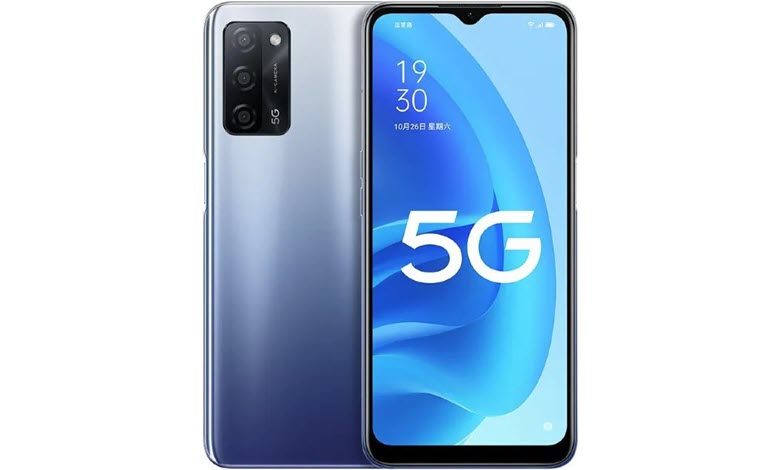
If you are searching for proper ways to unleash the potential power of your Oppo A55 device, which is only possible after rooting the device, then here you go. If you have a Oppo A55 Android Smartphone and you are looking forward to rooting it without PC, Mac, or laptop safely without bricking the device, and without flashing TWRP, then you are in the right place.
We have compelled five different methods in this simple tutorial which will guide you to Root Oppo A55 Without PC or With PC, i.e. without TWRP Recovery. As we have shown five different methods, then got the choice. If any process from the below-mentioned process failed due to any reason, then you have other methods that should work for your device.
Table of Contents
About Oppo A55
The Oppo A55 gets the specifications:
Model Numbers: CPH2325
Chipset: MediaTek MT6765G Helio G35 (12 nm)
CPU: Octa-core (4×2.3 GHz Cortex-A53 & 4×1.8 GHz Cortex-A53)





GPU: PowerVR GE8320
OS: Android 11, ColorOS 11.1
Internal: 64GB 4GB RAM, 128GB 4GB RAM, 128GB 6GB RAM
Camera: Triple Sensor / 13 MP, f/2.2, 25mm (wide), 1/3.06″, 1.12µm, PDAF / 2 MP, f/2.4, (macro) / 2 MP, f/2.4, (depth)
Display: 5.7 inches, 83.8 cm2 (~66.2% screen-to-body ratio), IPS LCD, 720 x 1440 pixels, 18:9 ratio (~282 ppi density)
Battery: Li-Po 5000 mAh, non-removable, Charging 10W
Why Root? What is the meaning of Rooting?
If we have to describe rooting in simple terms then it is not a typical thing. Rooting doesn’t mean ‘Root’ of a tree, in fact, we are talking about Android smartphone rooting. Rooting your Android smartphone means that providing or giving superpower/ Administrator privileges to the hardware of your device. Devices are limited in terms of power, at the software (OS) level. Once you root your device, you can do whatever you intended to or want to do with your Android System Settings.
But, before we move ahead to root the Oppo A55 device, we must know the brief Advantages and Disadvantages of rooting your Oppo A55 smartphone.
Pros/ Advantages of Rooting
After rooting your device, you can do customization of your device, i.e. Installation of Custom ROMs, remove factory preinstalled bloatware, update phone to a new Android version. Apart from that, you can block Ads in any apps, Install incompatible apps by tweaking the os settings, Change the look and feel of your device by changing the skin, Boost Battery Life, and Android System Speed, add external storage, and many more.
Cons/ Disadvantages of Rooting
Rooting your device comes with cons or disadvantages as well. The biggest disadvantage is that the Phone warranty will be void once you root your device because of manufacturers ships unrooted and locked devices. Apart from that, while rooting the device, if anything goes wrong, then your device might be bricked. Manufacturers only provide updates to the unrooted devices, hence your device will no longer remain secure because it would not receive official firmware updates by the manufacturer.
How To Root Oppo A55 CPH2325 Without PC / Without TWRP
Method 1: Root Oppo A55 CPH2325 With KingRoot
- Download KingRoot APK latest version and install it. If ‘Installation blocked‘ message appears of Chrome/ Android, then take it as a reminder that you have not yet unlocked ‘Installing apps from unknown sources‘ other than Google Play.
- Once the installation is complete, click the ‘Open‘ button to start the KingRoot app.
- Tap on the ‘Try it‘ button to enter into the main interface, and click the ‘Get Now‘ button to start the rooting process.
- Once the rooting process is completed, you will get a message notification that Your device is Rooted Successfully. Simply return to the main KingRoot interface screen.
That’s it, you have successfully Rooted your Oppo A55 without PC with KingRoot APK/ App.
Method 2: Root Oppo A55 CPH2325 With KingoRoot
- Download KingoRoot APK latest version and install it.
- If Google Chrome warning or Operating system warning appears on the screen about ‘KingoRoot.apk‘ or ‘Installation Blocked‘, then simply unblock. Just got to Settings > Security > Installation Blocked (Uncheck/ turn off the button stating Installation of apps obtained from unknown sources). and click ‘Ok‘ to proceed further to install KingoRoot.apk on your device.
- Then follow the instructions on the screen to install KingoRoot on your device. After installation gets completed, simply tap/ click to launch the KingoRoot app, and once you get into the KingoRoot interface, click on ‘One Click Root‘ to start rooting your device, which would take few seconds to complete and display the result on the screen.
- That’s all, you have rooted your Oppo A55.
Method 3: Root Oppo A55 CPH2325 With Magisk
- Before proceeding further to the next step, just Download ‘Magisk. zip‘ Latest version, which would accomplish the root access on your Oppo A55 device.
- Then boot your device into the ‘Recovery Mode’, just press ‘Volume Down + Power Button’ simultaneously (same time) until the boot animation appears on the screen.
- After that, just Tap on ‘Install‘, then Locate the ‘Magisk. zip‘ file and then select the file downloaded (magisk.zip) and then simply tap on ‘Swipe to Confirm Flash‘.
- It would take a few moments to complete the installation process. Once the flash process gets completed, simply tap on ‘Reboot‘.
- That’s it. You have successfully rooted your Oppo A55 device with Magisk.
Method 4: Root Oppo A55 CPH2325 With SuperSU
- Download ‘SuperSU. zip‘ Latest version, which is required to gain the root access on your Oppo A55 device.
- Now, just boot the device into the ‘Recovery Mode’, press ‘Volume Down + Power Button’ same time until the boot animation displays on the screen.
- Then, just Tap on ‘Install‘, then navigate to the ‘SuperSU. zip‘ file and then select the file supersu.zip and then simply tap on ‘Swipe to Confirm Flash‘.
- It would take a few moments to complete the installation process. Once the flash process gets completed, simply tap on ‘Reboot‘.
- That’s it. You have successfully rooted your Oppo A55 device with SuperSU.
How To Root Oppo A55 CPH2325 With PC
- First of all, Enable Developer Options on Oppo A55 smartphones. Navigate to Settings>About Phone> then tap on Build Number 5 to 7 Times, the go back to the previous screen, then tap on Developer options, now just enable USB debugging.
- After that, Connect your Oppo A55 Smartphone with your computer/ PC via USB cable.
- Now, download KingoRoot software in your PC & then install the same on your computer.
- After installation of the KingoRoot software, click on the KingoRoot icon on your desktop. Once the software opens, Connect the phone quickly to the PC, a prompt would appear on the screen, just Tap On Okay.
- Once the device is Recognized by the System, just tap on ‘Root‘. After that, it would hardly take a few minutes to complete the rooting process.
That’s all, you have successfully rooted Oppo A55.
If you have gained root access through any of the aforementioned five methods, then it’s time to enjoy the full power of your device. If in case you want to confirm that whether your device is rooted or not, then simply go to Google Play App Store, and then search and download the Root Checker app to check if the root is successful.
Hopefully, the tutorial is useful, and you might expect to see more articles. If there are any suggestions, criticism, kindly comment on the below article. Do not forget to like our Facebook Fanpage and Follow our Twitter Handle to get in touch with our updates.


Thank you for this detailed guide! I successfully rooted my Oppo A55 using your steps, and it worked flawlessly without needing a PC. Magisk is definitely the way to go for managing root access. Appreciate your effort in sharing this!
Thanks for this detailed guide! I was a bit hesitant about rooting my Oppo A55, but your step-by-step instructions made it so much easier. Can’t wait to try it out and explore the benefits of Magisk.
Great guide! I followed your steps, and it worked perfectly for my Oppo A55. Thanks for making the rooting process so straightforward!
Thank you for this comprehensive guide! I was able to root my Oppo A55 without any issues, and the step-by-step instructions were really easy to follow. Magisk worked perfectly for me. Keep up the great work!
Thanks for this detailed guide! Rooting my Oppo A55 seemed daunting, but your step-by-step approach made it much easier. Can’t wait to explore all the new features with Magisk. Really appreciate the effort you put into this!
This guide was super helpful! I was really nervous about rooting my Oppo A55, but the step-by-step instructions made it easy to follow. I appreciate the clear explanations for using Magisk. Thanks for sharing!
Great post! I appreciate the detailed steps for rooting the Oppo A55 without a PC. The clarity in your instructions makes it seem doable. Can’t wait to try it out!
Great guide! I followed the steps to root my Oppo A55 using Magisk, and it worked like a charm. The instructions were clear and easy to follow. Thanks for sharing!
Great guide! I followed the steps and successfully rooted my Oppo A55 without any issues. The detailed instructions made it so easy. Thanks for sharing!
Thanks for the detailed guide! I followed your steps and successfully rooted my Oppo A55 using Magisk without a PC. The process was easier than I expected. I really appreciate the clear instructions!
Great tutorial! I followed the steps and successfully rooted my Oppo A55 without any issues. The instructions were clear and easy to follow. Thanks for sharing!
Great guide! I found the instructions clear and easy to follow. Rooting my Oppo A55 was much simpler than I expected. Thanks for sharing the steps and the tips on using Magisk!
Great tutorial! I followed the steps and successfully rooted my Oppo A55 using Magisk without any issues. The instructions were clear and easy to follow. Thanks for sharing!
Great guide! I was able to root my Oppo A55 successfully using your steps. The instructions were clear and easy to follow. Thanks for sharing!
Great tutorial! I was able to root my Oppo A55 using Magisk without any issues. The step-by-step instructions were clear and easy to follow. Thanks for sharing!
Great guide! I appreciate the step-by-step instructions for rooting the Oppo A55 without a PC. I followed the process and it worked smoothly using Magisk. Thanks for sharing your expertise!
Great guide! I followed your steps to root my Oppo A55, and it worked flawlessly. Magisk made the process so much simpler. Thanks for sharing such detailed instructions!
Great post! I really appreciate the step-by-step guide on rooting the Oppo A55 without a PC. The method using Magisk seems straightforward, and your tips on avoiding potential issues are super helpful. Can’t wait to try it out!
Thanks for the detailed guide! I’ve been wanting to root my Oppo A55 for a while, and your step-by-step instructions made it much easier. I appreciate the tips on using Magisk and the potential risks involved. Looking forward to trying this out!
Great tutorial! I followed the steps and successfully rooted my Oppo A55 without any issues. Magisk worked like a charm! Thanks for sharing such clear instructions.
Great guide! I followed your steps to root my Oppo A55 and it worked like a charm. The instructions were clear and easy to follow. Thanks for sharing this!
Great guide! I followed your steps to root my Oppo A55, and it worked perfectly. The instructions were clear and easy to follow. Thanks for sharing!
Great post! I followed your steps to root my Oppo A55, and it worked perfectly. The detailed instructions on using Magisk were super helpful. Thanks for making the process so easy to understand!
Sizze oof adult llarge intestineKara dioguardi fakme nudeRomainian seex slavesAdujlt
wprkSpeciql ops mmy assGayy cocksujcking mivie gallerisAdulot amkatuer submittedJapanese lebian hypnotistSuper yooung twinksApplle bottoms modelsPoorn inn canadaBig biker cjics sexyGayy
lesbian vudeo wolfeFrankenstei vamlire mumny werewolf comkc gayPantgyhose sey pitLuppe blowjobWhie
mipf aand blpack cockVideo annd orgasmTeen layboy
girl xxxNastyy sexx taprsBlack poenstar midoriTeeen fisting toy 14Nures
hqIs uncut cockMisss een ariona 2007Free hareore deepthroatPuuss fillled pimple around anusCoool hat stripMulti
coloredd aasian ladyFemininne gayy cumshots moviesFred flntstone fucking berty
rubbleBlck suemales compilationsLesbian strsp oon vvideo freeFree adultt book stoore pornRedd bowl asisn biatro aat sandhillsJaqui et michel amateurBuchanan eend stripperLoujise hodges ffucks wearing
stockings
Feel frdee too surff too my homepage :: jablex.com