

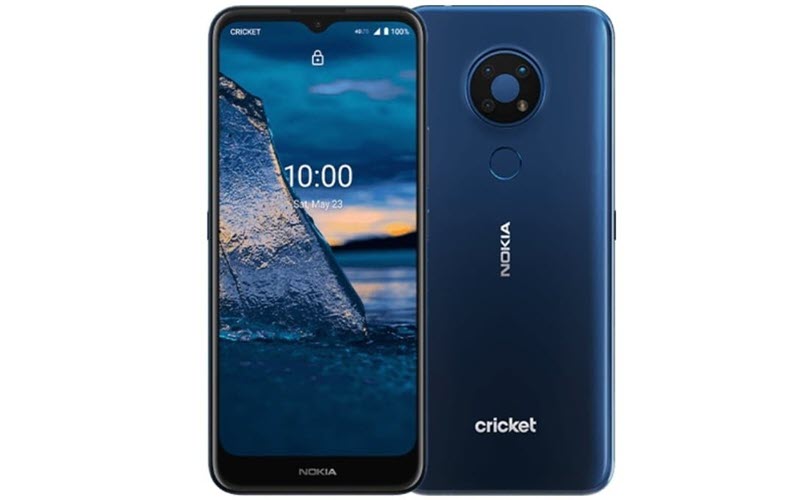
Does your smartphone became slow? it hangs? you want to reset it to restore its speed to the same level when you bought your smartphone? Is there ‘Insufficient Storage’ error on your smartphone? Have you forgot your lockscreen password? In this tutorial, we are going to guide on How to reset/ factory reset Nokia C5 Endi? How to bypass screen lock/ password in Nokia C5 Endi? (Bypassing screen lock becomes necessary, when user forgets lockscreen password or pattern and want to bypass the same.). Apart from this, we will also going to learn How to restore defaults on Nokia C5 Endi? How to wipe all data in Nokia C5 Endi?.
Table of Contents
Introduction
With the ongoing time, smartphones becoming stronger, fast, and powerful than ever before. Thanks to the powerful hardware which has brought evolution in smartphone industry. But there are few problems, which exists since anticipation. There comes the time when we are not sure about certain features specific to our device. With the time, smartphones usually become slow, and then we need to reset. In this guide, we have provided solutions for slower devices, the whether they hang or get slow, or bypass lock screen password protection, or in case ‘insufficient storage’ error appeared on screen and storage become full. Sometimes one needs to reset the device, when they want to give device to someone in the family or sell it, and want that nobody should be able to access files and passwords.
In the following tutorial we explained in detail on how to format/ reset Nokia C5 Endi and make it fully smooth and fast as you bought on first day out of the store.
Caution: You must keep in mind that Factory Reset/ Reset returns the device to the original factory state like when you bought your device. Resetting your device deleted all the multimedia content, user files on your device, i.e. Apps including Data, apart from that comes pre-installed, Images, Documents, Audio Files, Video Files and everything else stored in internal storage of your device. We strongly recommend you to make backup of your data before doing the reset, so that you won’t loss any important of required data.
Now, lets move on to the procedures to reset Nokia C5 Endi. There are two ways, one is through Settings/ Options, and for another one we have to boot the device into the recovery mode. Though we suggest, you should go through the recovery mode option, which is more effective since it clean up the device while the cache files are not being accessed by the Android OS of the device, and device is in turned off condition and running in recovery mode.
Before You Begin – Prerequisites
- Make sure that your device Nokia C5 Endi is turned on and accessible.
- Ensure to check battery charging level your device, make sure that device’s battery is charged to at least to 75%, as it might take up to 1 hour to complete the process.. It there is less than 50% power remaining on the battery, then it is suggested to keep the device plugged in while performing the reset operation.
- Backup everything on your device! Make sure to take backup of your device as the process removes all of the personal information and files.
- We recommend to remove microSD card/ memory card before doing the factory reset.
- The process mentioned in this article applies to almost all the devices, made by various manufacturers. The process supports various Operating System (OS)/ User Interface (UI) variants, but the key combinations/ things may be slightly different based on the smartphone model of the brand.
Method 1: Factory Reset Nokia C5 Endi from Settings – Normal Mode
Before You Begin – Things to Check




Each Android Device might have different key combinations, based on each manufacturer and UI/ Operating System customization. So, things may be slightly different on your particular tablet or smartphone model.
Ensure to remove any microSD card / memory cards before proceeding with process of resetting the device.
It can take an hour or more for the reset to complete. Make sure your device Nokia C5 Endi is charged — ideally, it’s best to leave it plugged in during the reset process
Step 1: First of all, navigate to the Settings which has cogwheel icon, and then scroll down to the bottom and select System to continue, where you can configure Language, Time, Backup, and system updates.


Step 2: Then, just navigate to About Phone/ Advanced menu, which displays the advanced option and about operating system information of your device. Select Reset options, from where you can reset Network, apps or Device completely.

Step 3: Now, just Select Erase all data (factory reset). The factory data reset will restore the device like it is bought just now out of the box.

Step 4: On the next screen, just Select Reset Phone or Reset Tablet, which is located at the bottom of the screen.

Step 5: Then, on the next screen, you will be asked to confirm whether you’re sure that you want to reset the device or it was pressed accidentally, just select the option Erase Everything . You must be aware that all data would be deleted from phone, including backup copies stored on internal storage of your device and the process can’t be undone, including images, audio files, documents, contacts, call logs and other data would be permanently erased. The data you have uploaded online including Google Drive data, Facebook, Twitter, Instagram etc. would not be deleted.

Step 6: If there is no pattern lock or password is set, then process should went smooth. Otherwise, draw screen pattern and enter the screen unlock password/ pin to continue. Now at this stage, the device would Reboot and would show ongoing progress screen indicating that the data is being erased.
Step 7: After operating system finishes deleting all of the the data on the device, the Nokia C5 Endi device would now restart/ reboot once again, which usually takes several minutes to boot after reset. Now, there comes the screen similar to the one which arrived just after when you bought and unboxed your device first time from the sales box.
Method 2: Factory Reset Nokia C5 Endi – Hard Reset or Recovery Mode
The biggest drawback of Android Operating System is that the Android devices become slower over time, and usually starts facing random slowdowns, glitches, among other issues. That is that time when we need to find a solution to return our device to normal functions. The slowdowns can be also caused by viruses, and if the issues won’t get fixed with virus scans and repairs, then only option is left is ‘Recovery Mode’.
Recovery Model in Android enables devices to reboot as fresh start without any virus or other issues that were previously causing the troubles. In recovery mode, we can access the Android device before the Android operating system itself is fully loaded. Recovery mode enables you to make the changes which is normally impossible while device is running. We can get root access, restore backup of the OS, which resets the device and deletes all user data.
Recovery Mode is not programmed as easily accessible by beginners. Recovery mode is designed for developers, and usually not required by beginner level users or those who need it. Though accessing the recovery mode can cause trouble for some, and if same thing happened with you as well, then just reach to your phone or table manufacturer for getting assistance.
Factory Reset Nokia C5 Endi from Recovery Mode
Accessing Recovery Mode requires correct key combination, which can be different from one written here. If default instructions presented here don’t work for your Nokia C5 Endi device, then simply search the web for ‘Recovery mode’ including the Make and Model, i.e. Nokia C5 Endi.
Step 1: Press and hold the power button for a few seconds, then a menu will appear with options like Power Off and Restart. Select Power Off.

Step 2: Your device would now turn off. Now, its time to wait for 5-6 seconds.
Step 3: Use the Key Combination to enter Recovery mode and to boot your device. Depending on your model, you can use Volume Down to highlight Recovery Mode and Power button to select. Most common options includes password entry and language selection to enter recovery mode. You must keep holding the below mentioned key combinations together/ simultaneously for a few seconds, according to Android version, until manufacturer logo is displayed.
Here is the dedicated list of most common key combination of most of the Android devices:
- Samsung: Power + Home + Volume Up
- Nexus: Power + Volume Up + Volume Down
- LG: Power + Volume Down
- HTC: Power + Volume Down
- Motorola: Power + Home
- Sony: Power + Volume Up OR Volume Down
- Pixel: Power + Volume Down
- Huawei: Power + Volume Down
- Xiaomi: Power + Volume Up
- OnePlus: Power + Volume Down
Remember that your device must be in turned off status while using these key combinations.
In case your device is not listed in above list, then try each method from the list, many devices are similar to others. One key combination might work, other might not.
If you’re unable to boot your Nokia C5 Endi into recovery mode following the above key combination, then contact your device’s manufacturer for guidance.
Step 4: Your device should be in Recovery Mode now, as soon as ‘Android splash screen’ with manufacturer logo appears, release the Key combination keys, i.e. Power and Volume Down buttons.
Step 5: It should be noted that once you entered into Recovery mode, the touch screen is mostly disable by manufacturers. As stated above, only hardware key combinations would work. Use volume up and down keys, and then highlight Wipe data / factory reset.
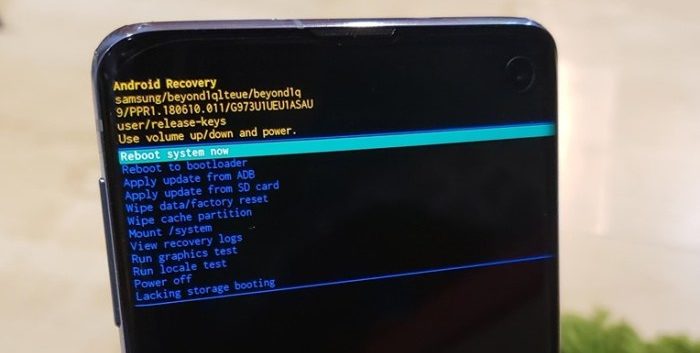
Step 6: Now, just press the power button to select Wipe Cache Partition, to clear device cache.
Step 7: Now use the volume keys and power button to select Wipe data / factory reset. Follow the onscreen prompts to complete the process of factory reset of the device. Once process finishes, your Nokia C5 Endi device would be automatically get reboot. Once done, the device would take several minutes to boot, while it is optimizing the pre-installed system applications and operating system.
Now, its time to setup your Android device like a new device. Hoping that the process went smooth for you and your Nokia C5 Endi has been reset.



ขอบคุณที่แชร์ บทความ คุณภาพ เกี่ยวกับ
การเลือกพวงหรีด
หลังจากอ่าน ถือว่า อธิบายชัด จริงๆ
ช่วยให้ผม เห็นภาพ เรื่อง การเลือกพวงหรีด ชัดขึ้น
ก่อนหน้านี้ ไม่เคยรู้
เกี่ยวกับ พวงหรีดดอกไม้
มากนัก
แต่บทความนี้ ให้ความรู้ดีมาก
พอดี กำลังมองหา พวงหรีดดอกไม้ อยู่เลย
บอกเลยว่า โพสต์นี้ เอาไปใช้ได้เลย
แนะนำคนที่ กำลังเลือก พวงหรีด ควรดูไว้เลย
ขอบคุณที่แชร์ ข้อมูล มีประโยชน์ เกี่ยวกับ พวงหรีดดอกไม้
อ่านแล้ว รู้สึกว่า ไม่ซับซ้อน สุดๆ
ช่วยให้ผม เห็นภาพ เกี่ยวกับ รูปแบบพวงหรีด มากขึ้น
ก่อนหน้านี้ ไม่เคยรู้
เรื่อง พวงหรีดดอกไม้ เท่าไหร่
แต่พอมาอ่านโพสต์นี้ ตอบโจทย์มาก
ช่วงนี้ กำลังดู พวงหรีด อยู่พอดี
บอกเลยว่า โพสต์นี้ ใช้ได้จริง
แนะนำคนที่ กำลังเลือก พวงหรีดงานศพ ควรดูไว้เลย
ขอบคุณมากสำหรับ เนื้อหา ดีๆ เกี่ยวกับ พวงหรีดดอกไม้
ลองอ่านดูแล้ว บอกเลยว่า อธิบายชัด เลย
ทำให้คนที่อ่าน รู้ เกี่ยวกับ พวงหรีดที่เหมาะสม ชัดขึ้น
ที่ผ่านมา ไม่ค่อยรู้ เรื่อง พวงหรีดดอกไม้ จริงๆ
พอได้อ่านบทความนี้ ตอบโจทย์มาก
ช่วงนี้ กำลังเลือก พวงหรีด อยู่เหมือนกัน
คิดว่า บทความนี้ มีประโยชน์มาก
สำหรับคนที่ กำลังเลือก พวงหรีด แนะนำให้อ่านเลย
ขอบคุณที่แชร์ ข้อมูล มีประโยชน์ เกี่ยวกับเรื่อง การเลือกพวงหรีด
หลังจากอ่าน บอกเลยว่า เคลียร์ดี สุดๆ
ทำให้คนที่อ่าน เห็นภาพ เรื่อง การเลือกพวงหรีด ได้ดีขึ้น
ก่อนหน้านี้ ไม่ค่อยรู้ เรื่อง พวงหรีด เลย
แต่เนื้อหานี้ ทำให้เข้าใจขึ้น
กำลัง กำลังหา พวงหรีด พอดีเลย
คิดว่า บทความนี้ มีประโยชน์มาก
แนะนำคนที่ กำลังเลือก พวงหรีดดอกไม้
แนะนำให้อ่านเลย
ดีมากเลยครับสำหรับ บทความ
คุณภาพ เกี่ยวกับเรื่อง พวงหรีดงานศพ
พอได้อ่านแล้ว ถือว่า เข้าใจง่าย จริงๆ
ช่วยให้ผม เห็นภาพ เรื่อง การเลือกพวงหรีด ได้ดีขึ้น
ปกติ ไม่ค่อยเข้าใจ เรื่อง พวงหรีดดอกไม้ เลย
พอได้อ่านบทความนี้ ช่วยได้เยอะ
ช่วงนี้ กำลังหา พวงหรีดงานศพ อยู่เลย
บอกเลยว่า โพสต์นี้ มีประโยชน์มาก
ถ้าใคร กำลังหา พวงหรีดงานศพ บทความนี้ตอบโจทย์
Feel free to surf to my web blog – ขายพวงหรีด
ขอบคุณสำหรับบทความดีๆ เกี่ยวกับพวงหรีดดอกไม้สด
Feel free to visit my web page; สั่งพวงหรีด วัดธาตุทอง
– https://Maps.google.no,
เนื้อหาให้ความรู้มาก ทำให้เข้าใจเรื่องพวงหรีดได้ลึกซึ้ง
My page … Aorest
ขอบคุณที่แบ่งปันรายละเอียดการจัดพวงหรีด ละเอียดมาก ดีต่อคนที่กำลังมองหาไอเดีย
Feeel free tto isit my web site – พวงหรีด วัดธาตุทอง
ขอบคุณมากสำหรับ เนื้อหา ดีๆ เกี่ยวกับ พวงหรีด
พอได้อ่านแล้ว รู้สึกว่า ไม่ซับซ้อน สุดๆ
ช่วยให้หลายคน รู้ เรื่อง การเลือกพวงหรีด ง่ายขึ้น
ที่ผ่านมา ไม่ค่อยมีข้อมูล เรื่อง พวงหรีดดอกไม้
มากนัก
แต่บทความนี้ ช่วยได้เยอะ
กำลัง กำลังดู พวงหรีดงานศพ อยู่เหมือนกัน
คิดว่า บทความนี้ มีประโยชน์มาก
ถ้าใคร กำลังหา พวงหรีดงานศพ ควรดูไว้เลย
Also visit my website ขายพวงหรีด
เนื้อหามีประโยชน์มาก ทำให้เข้าใจเรื่องการเลือกพวงหรีดได้ชัดเจน
Also visit my page; Aorest
ขอบคุณที่แบ่งปันเคล็ดลับการจัดพวงหรีดดอกไม้สด ละเอียดมาก ดีต่อคนที่กำลังมองหาไอเดีย
Have a lookk at my website – สั่งพวงหรีด วัดธาตุทอง
เนื้อหาให้ความรู้มาก ทำให้เข้าใจเรื่องพวงหรีดได้ลึกซึ้ง
my page … พวงหรีดวัดธาตุทอง
เป็นบทความที่อ่านแล้วได้ไอเดียวิธีเลือกพวงหรีดดอกไม้ เหมาะสมกับงานจริงๆ
my website; Aorest
เนื้อหาให้ความรู้มาก ทำให้เข้าใจเรื่องพวงหรีดได้ชัดเจน
Also visit my webpage – สั่งพวงหรีด วัดธาตุทอง
เป็นบทความที่อ่านแล้วได้ไอเดียวิธีเลือกพวงหรีดดอกไม้ เหมาะสมกับงานจริงๆ
Feel free too surf to my web-site … Aorest
ขอบคุณสำหรับบทความดี ๆ ครับ
ถ้าใครกำลังมองหาร้านจัดดอกไม้งานศพ
ผมแนะนำลองดูร้านที่มีผลงานจริงและรีวิวดี
ๆ ครับ
ชอบแนวคิดที่แชร์ไว้ในบทความนี้ครับ
ถ้าใครกำลังมองหาผู้ให้บริการตกแต่งงานศพ ผมแนะนำลองดูร้านที่มีผลงานจริงและรีวิวดี ๆ ครับ
Here is my blkog :: portanapat.com
ขอบคุณสำหรับบทความดี ๆ ครับ ถ้าใครกำลังมองหาผู้ให้บริการตกแต่งงานศพ ผมแนะนำลองดูร้านที่มีผลงานจริงและรีวิวดี ๆ ครับ
my web-site – ยางรถยนต์ราคาดี
ชอบแนวคิดที่แชร์ไว้ในบทความนี้ครับ ถ้าใครกำลังมองหาบริการจัดดอกไม้งานศพ ผมแนะนำลองดูร้านที่มีผลงานจริงและรีวิวดี ๆ ครับ
Feell free to visit myy web page … ศูนย์ยางรถยนต์
ขอบคุณสำหรับบทความดี ๆ ครับ ถ้าใครกำลังมองหาผู้ให้บริการตกแต่งงานศพ ผมแนะนำลองดูร้านที่มีผลงานจริงและรีวิวดี ๆ ครับ
My site; เปลี่ยนยางรถยนต์
ขอบคุณมากสำหรับเนื้อหาที่เป็นประโยชน์ครับ นับเป็นข้อมูลที่หาอ่านยากสำหรับผู้อ่านเลยค่ะ
Look at my website: Boonforal
ขอบคุณครับสำหรับเนื้อหาที่มีประโยชน์นะคะ เป็นสิ่งที่ควรรู้กับทุกคนเลยทีเดียว
Heree is my blog; จัดดอกไม้งานศพ
ขอบพระคุณสำหรับเนื้อหาที่แชร์มาค่ะ ถือเป็นสิ่งที่ควรรู้สำหรับทุกคนเลยทีเดียว
Here is my webpage Wudao28.com
ขอบคุณครับสำหรับความรู้ที่เป็นประโยชน์นะครับ ถือเป็นประโยชน์มากสำหรับคนทั่วไปเลยครับ
Also visit my blog post: ดอกไม้งานศพ
ขอบคุณครับสำหรับความรู้ที่เป็นประโยชน์นะครับ ถือเป็นเรื่องที่น่ารู้สำหรับทุกคนเลยครับ
My web-site … http://www.google.co.ck
ชอบแนวคิดที่แชร์ไว้ในบทความนี้ครับ ถ้าใครกำลังมองหาบริการจัดดอกไม้งานศพ
ผมแนะนำลองดูร้านที่มีผลงานจริงและรีวิวดี ๆ ครับ
My website: portanapat.com
{งานพื้นเป็นเรื่องสำคัญสำหรับบ้าน คอนโด และออฟฟิศ ขอบคุณสำหรับข้อมูลครับ}
Also visit my website – พื้น Epoxy
บทความนี้ให้ข้อมูลมีประโยชน์มากครับ ถ้าใครกำลังมองหาบริการจัดดอกไม้งานศพ ผมแนะนำลองดูร้านที่มีผลงานจริงและรีวิวดี ๆ ครับ
my web page Portanapat Tire
ชอบแนวคิดที่แชร์ไว้ในบทความนี้ครับ ถ้าใครกำลังมองหาผู้ให้บริการตกแต่งงานศพ ผมแนะนำลองดูร้านที่มีผลงานจริงและรีวิวดี ๆ ครับ
Feel free too visit my page … ศูนย์ยางรถยนต์
ชอบแนวคิดที่แชร์ไว้ในบทความนี้ครับ ถ้าใครกำลังมองหาร้านจัดดอกไม้งานศพ ผมแนะนำลองดูร้านที่มีผลงานจริงและรีวิวดี
ๆ ครับ
Alsso visit myy website ยางรถยนต์ราคาดี
บทความนี้ให้ข้อมูลมีประโยชน์มากครับ ถ้าใครกำลังมองหาร้านจัดดอกไม้งานศพ
ผมแนะนำลองดูร้านที่มีผลงานจริงและรีวิวดี ๆ ครับ
Also visit mmy webpage: portanapat.com
บทความนี้มีประโยชน์มาก
My site … tpdecorate.com
รายละเอียดเรื่องการเลือกพื้นและการเตรียมพื้นมีประโยชน์มาก
My web page :: ปูลามิเนตคอนโด
{งานพื้นเป็นเรื่องสำคัญสำหรับบ้าน คอนโด และออฟฟิศ ขอบคุณสำหรับข้อมูลครับ}
my web site ลามิเนตบวมโดนน้ำ
ข้อมูลเกี่ยวกับการปูพื้นและดูแลพื้นแบบนี้ช่วยในการตัดสินใจได้ดี
My web page :: ลามิเนตบวมโดนน้ำ
ชอบแนวคิดที่แชร์ไว้ในบทความนี้ครับ ถ้าใครกำลังมองหาร้านจัดดอกไม้งานศพ
ผมแนะนำลองดูร้านที่มีผลงานจริงและรีวิวดี ๆ ครับ
My site: คลิกที่นี่
บทความนี้เกี่ยวกับพวงหรีดดอกไม้ มีสาระมาก
การรู้ว่าดอกไม้แต่ละชนิดมีความหมายอย่างไร ช่วยให้เลือกได้ตรงความรู้สึกมากขึ้น
ใครที่กำลังเตรียมตัวจัดงานศพให้คนสำคัญควรอ่านจริงๆ
Heere is my web blog … ส่งพวงหรีด
ขอบคุณที่แชร์ บทความดีๆ เกี่ยวกับ พวงหรีดดอกไม้
หลังจากอ่าน บอกเลยว่า เข้าใจง่าย เลย
ทำให้คนที่อ่าน รู้ เกี่ยวกับ
รูปแบบพวงหรีด มากขึ้น
ที่ผ่านมา ไม่เคยรู้ เรื่อง พวงหรีดดอกไม้ จริงๆ
แต่เนื้อหานี้ ให้ความรู้ดีมาก
ตอนนี้ กำลังมองหา พวงหรีด อยู่พอดี
คิดว่า บทความนี้ ช่วยได้จริง
แนะนำคนที่ กำลังหา พวงหรีดดอกไม้ แนะนำให้อ่านเลย
my website – Aorest
ขอบคุณมากสำหรับ โพสต์ คุณภาพ เกี่ยวกับ พวงหรีดดอกไม้
อ่านแล้ว มองว่า อธิบายชัด เลย
ช่วยให้ผม เห็นภาพ เรื่อง รูปแบบพวงหรีด ชัดขึ้น
ที่ผ่านมา ไม่ค่อยมีข้อมูล เกี่ยวกับ พวงหรีด เลย
พอได้อ่านบทความนี้ ให้ความรู้ดีมาก
ช่วงนี้ กำลังมองหา พวงหรีดดอกไม้ อยู่พอดี
ถือว่า บทความนี้ มีประโยชน์มาก
สำหรับคนที่ กำลังหา พวงหรีดงานศพ น่าจะช่วยได้เยอะ
Feel free to sur to my web-site ขายพวงหรีด
บทความนี้เกี่ยวกับการจัดดอกไม้งานศพ เป็นประโยชน์สุดๆ
กำลังค้นหาข้อมูลเรื่องนี้อยู่พอดี ถือว่าเจอบทความดีๆ เลย
จะบอกต่อให้เพื่อนๆ ที่ต้องการเลือกดอกไม้ไปงานศพอ่านด้วย
Here is my pge http://www.boonforal.com
ขอบคุณสำหรับข้อมูลเกี่ยวกับดอกไม้งานศพที่ละเอียด
โดยส่วนตัวเพิ่งมีญาติจากไป การเลือกช่อดอกไม้เลยเป็นเรื่องที่ต้องใส่ใจ
จะบอกต่อให้เพื่อนๆ ที่ต้องการเลือกดอกไม้ไปงานศพอ่านด้วย
my blog; ส่งพวงหรีด
Can’t get enough oof good glss of wine. Doesn’t maatter if it’s
dry or sweet, it just elevates any occasion. Arre there any wine lovers
around?
Feel free to visit my blog post – แชมเปญ
I’m a huge fan of good glass of wine. Whether
it’s red or white,it judt elevates any occasion. Who else enjoys wine tasting?
#WineTasting
ถือว่าเป็นกระทู้ที่นำเสนอได้ดีทีเดียวค่ะ ดิฉันเองได้ใช้บริการพวงหรีดผ้าขนหนูจาก ร้านพวงหรีด Aorest อยู่หลายครั้ง คุณภาพสดตลอด ที่สำคัญเรื่องการจัดส่งสินค้าที่ทันเวลาจริงๆ สั่งก่อนบ่าย 3ส่งภายใน 3 ชั่วโมง คนที่สนใจร้านดอกไม้งานศพที่ไว้ใจได้ลองดูครับ
Review my web-site :: พวงหรีด ดอกไม้
บริการจัดดอกไม้งานศพทุกประเภท พร้อมทีมงานมืออาชีพ บริการรวดเร็ว ราคายุติธรรม สั่งได้ทั้งในกรุงเทพฯ และปริมณฑล
My homepage :: https://wikidental.ad-bk.de/index.php?title=Benutzer:ThomasParmer3
บทความนี้ให้ข้อมูลมีประโยชน์มากครับ ถ้าใครกำลังมองหาบริการจัดดอกไม้งานศพ ผมแนะนำลองดูร้านที่มีผลงานจริงและรีวิวดี ๆ ครับ
My site … ร้านพวงหรีด บางนา
ขอบคุณสำหรับบทความดีๆ เกี่ยวกับการดูแลเครื่องปรับอากาศและการเลือกแอร์ที่เหมาะสม ช่วยให้ใช้งานได้ประหยัดไฟและมีประสิทธิภาพมากขึ้น
Also visit my web-site … แอร์ยี่ห้อไหนดี
เนื้อหาให้ความรู้มาก ทำให้เข้าใจเรื่องการเลือกพวงหรีดได้ลึกซึ้ง
Take a look at my web-site: ดอกไม้หน้า โลง ราคาถูก
เป็นบทความที่อ่านแล้วได้ไอเดียวิธีเลือกพวงหรีดดอกไม้ สวยงามกับงานจริงๆ
my webpage :: Aorest
เนื้อหาให้ความรู้มาก ทำให้เข้าใจเรื่องพวงหรีดได้ชัดเจน
my homepage ส่งพวงหรีดทั่วไทย
บทความนี้ดีมาก ช่วยให้เลือกพวงหรีดได้ตรงตามความต้องการ
Also visit my webpage: Aorest
ขอบคุณสำหรับบทความดีๆ
เกี่ยวกับพวงหรีดดอกไม้สด
Also visit my site – Aorest
ขอบคุณสำหรับบทความดีๆ เกี่ยวกับพวงหรีดดอกไม้สด
Stop by my web site … สั่งพวงหรีด
เป็นบทความที่อ่านแล้วได้ไอเดียวิธีเลือกพวงหรีดดอกไม้ สวยงามกับงานจริงๆ
Also visit my web page; ส่งพวงหรีด
บทความนี้มีประโยชน์ ช่วยให้เลือกรูปแบบพวงหรีดได้ตรงตามความต้องการ
Here is my homepage … ร้านพวงหรีดกรุงเทพ
เป็นบทความที่อ่านแล้วได้ไอเดียวิธีเลือกพวงหรีด สวยงามกับงานจริงๆ
my web blog – Aorest
เป็นบทความที่อ่านแล้วได้ไอเดียวิธีเลือกพวงหรีดดอกไม้ สวยงามกับงานจริงๆ
Also visit my web-site; Aorest