

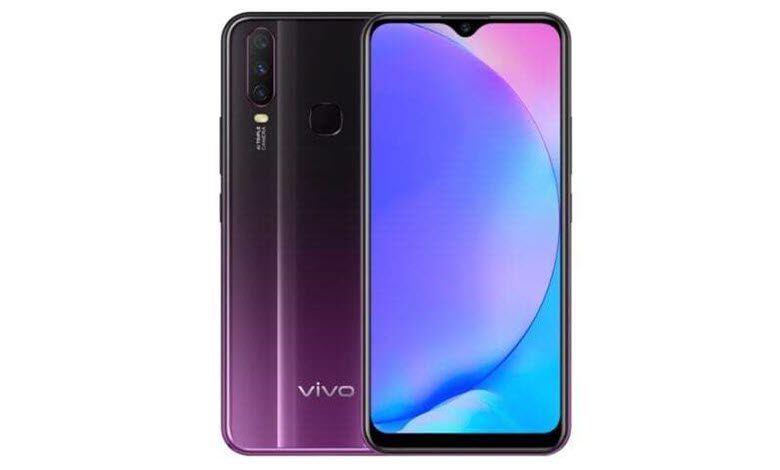
If you are searching for proper ways to unleash the potential power of your Vivo Y17 device, which is only possible after rooting the device, then here you go. If you have a Vivo Y17 Android Smartphone and you are looking forward to rooting it without PC, Mac, or laptop safely without bricking the device, and without flashing TWRP, then you are in the right place.
We have compelled five different methods in this simple tutorial which will guide you to Root Vivo Y17 Without PC or With PC, i.e. without TWRP Recovery. As we have shown five different methods, then got the choice. If any process from the below-mentioned process failed due to any reason, then you have other methods that should work for your device.
Table of Contents
About Vivo Y17
The Vivo Y17 gets the specifications:
Model Number: 1902
Chipset: Mediatek MT6765 Helio P35 (12nm)
CPU: Octa-core (4×2.3 GHz Cortex-A53 & 4×1.8 GHz Cortex-A53)






GPU: PowerVR GE8320
OS: Android 9.0 (Pie), Funtouch 9
Internal: 128GB 4GB RAM
Camera: Triple / 13 MP, f/2.2, PDAF / 8 MP, f/2.2, 16mm (ultrawide) / 2 MP, f/2.4, (depth)
Display: 6.35 inches, 99.6 cm2 (~81.4% screen-to-body ratio), IPS LCD, 720 x 1544 pixels (~268 ppi density)
Battery: Li-Po 5000 mAh, non-removable, Fast charging 18W
Why Root? What is the meaning of Rooting?
If we have to describe rooting in simple terms then it is not a typical thing. Rooting doesn’t mean ‘Root’ of a tree, in fact, we are talking about Android smartphone rooting. Rooting your Android smartphone means that providing or giving superpower/ Administrator privileges to the hardware of your device. Devices are limited in terms of power, at the software (OS) level. Once you root your device, you can do whatever you intended to or want to do with your Android System Settings.
But, before we move ahead to root the Vivo Y17 device, we must know the brief Advantages and Disadvantages of rooting your Vivo Y17 smartphone.
Pros/ Advantages of Rooting
After rooting your device, you can do customization of your device, i.e. Installation of Custom ROMs, remove factory preinstalled bloatware, update phone to a new Android version. Apart from that, you can block Ads in any apps, Install incompatible apps by tweaking the os settings, Change the look and feel of your device by changing the skin, Boost Battery Life, and Android System Speed, add external storage, and many more.
Cons/ Disadvantages of Rooting
Rooting your device comes with cons or disadvantages as well. The biggest disadvantage is that the Phone warranty will be void once you root your device because of manufacturers ships unrooted and locked devices. Apart from that, while rooting the device, if anything goes wrong, then your device might be bricked. Manufacturers only provide updates to the unrooted devices, hence your device will no longer remain secure because it would not receive official firmware updates by the manufacturer.
How To Root Vivo Y17 Without PC / Without TWRP
Method 1: Root Vivo Y17 With KingRoot
- Download KingRoot APK latest version and install it. If ‘Installation blocked‘ message appears of Chrome/ Android, then take it as a reminder that you have not yet unlocked ‘Installing apps from unknown sources‘ other than Google Play.
- Once the installation is complete, click the ‘Open‘ button to start the KingRoot app.
- Tap on the ‘Try it‘ button to enter into the main interface, and click the ‘Get Now‘ button to start the rooting process.
- Once the rooting process is completed, you will get a message notification that Your device is Rooted Successfully. Simply return to the main KingRoot interface screen.
That’s it, you have successfully Rooted your Vivo Y17 without PC with KingRoot APK/ App.
Method 2: Root Vivo Y17 With KingoRoot
- Download KingoRoot APK latest version and install it.
- If Google Chrome warning or Operating system warning appears on the screen about ‘KingoRoot.apk‘ or ‘Installation Blocked‘, then simply unblock. Just got to Settings > Security > Installation Blocked (Uncheck/ turn off the button stating Installation of apps obtained from unknown sources). and click ‘Ok‘ to proceed further to install KingoRoot.apk on your device.
- Then follow the instructions on the screen to install KingoRoot on your device. After installation gets completed, simply tap/ click to launch the KingoRoot app, and once you get into the KingoRoot interface, click on ‘One Click Root‘ to start rooting your device, which would take few seconds to complete and display the result on the screen.
- That’s all, you have rooted your Vivo Y17.
Method 3: Root Vivo Y17 With Magisk
- Before proceeding further to the next step, just Download ‘Magisk. zip‘ Latest version, which would accomplish the root access on your Vivo Y17 device.
- Then boot your device into the ‘Recovery Mode’, just press ‘Volume Down + Power Button’ simultaneously (same time) until the boot animation appears on the screen.
- After that, just Tap on ‘Install‘, then Locate the ‘Magisk. zip‘ file and then select the file downloaded (magisk.zip) and then simply tap on ‘Swipe to Confirm Flash‘.
- It would take a few moments to complete the installation process. Once the flash process gets completed, simply tap on ‘Reboot‘.
- That’s it. You have successfully rooted your Vivo Y17 device with Magisk.
Method 4: Root Vivo Y17 With SuperSU
- Download ‘SuperSU. zip’ Latest version, which is required to gain the root access on your Vivo Y17 device.
- Now, just boot the device into the ‘Recovery Mode’, press ‘Volume Down + Power Button’ same time until the boot animation displays on the screen.
- Then, just Tap on ‘Install‘, then navigate to the ‘SuperSU. zip‘ file and then select the file supersu.zip and then simply tap on ‘Swipe to Confirm Flash‘.
- It would take a few moments to complete the installation process. Once the flash process gets completed, simply tap on ‘Reboot‘.
- That’s it. You have successfully rooted your Vivo Y17 device with SuperSU.
How To Root Vivo Y17 With PC
- First of all, Enable Developer Options on Vivo Y17 smartphones. Navigate to Settings>About Phone> then tap on Build Number 5 to 7 Times, the go back to the previous screen, then tap on Developer options, now just enable USB debugging.
- After that, Connect your Vivo Y17 Smartphone with your computer/ PC via USB cable.
- Now, download KingoRoot software in your PC & then install the same on your computer.
- After installation of the KingoRoot software, click on the KingoRoot icon on your desktop. Once the software opens, Connect the phone quickly to the PC, a prompt would appear on the screen, just Tap On Okay.
- Once the device is Recognized by the System, just tap on ‘Root‘. After that, it would hardly take a few minutes to complete the rooting process.
That’s all, you have successfully rooted Vivo Y17.
If you have gained root access through any of the aforementioned five methods, then it’s time to enjoy the full power of your device. If in case you want to confirm that whether your device is rooted or not, then simply go to Google Play App Store, and then search and download the Root Checker app to check if the root is successful.
Hopefully, the tutorial is useful, and you might expect to see more articles. If there are any suggestions, criticism, kindly comment on the below article. Do not forget to like our Facebook Fanpage and Follow our Twitter Handle to get in touch with our updates.



Great tutorial! I followed your steps and managed to root my vivo Y17 successfully. The instructions were clear and easy to understand. Thanks for sharing!
Great post! I found the step-by-step guide super easy to follow. Rooting my vivo Y17 was a breeze, and using Magisk was really straightforward. Thanks for sharing!
Great guide! I followed your steps to root my Vivo Y17 using Magisk, and it worked perfectly. Thanks for making the process so clear and easy to follow!
Great guide! I followed your steps to root my vivo Y17 without a PC, and it worked seamlessly. The detailed instructions made the process much easier. Thanks for sharing!
Great post! I followed your steps to root my Vivo Y17, and it worked perfectly! The instructions were clear and easy to follow. Thanks for sharing such helpful information!
Great post! The step-by-step guide was easy to follow, and I successfully rooted my vivo Y17 using Magisk. Thanks for sharing such detailed instructions!
Thanks for the detailed guide! I was really hesitant about rooting my vivo Y17, but your steps made it so simple. I appreciate the emphasis on using Magisk for systemless rooting. Can’t wait to try it out!
Great tutorial! I followed your steps to root my Vivo Y17, and it worked perfectly. Thanks for making it so easy to understand!
This guide is super helpful! I was a bit hesitant about rooting my Vivo Y17, but the step-by-step instructions made it easy to follow. Thanks for including the Magisk details—I appreciate the added depth. Excited to explore the new possibilities!
Great tutorial! I followed your steps to root my Vivo Y17 using Magisk, and it worked perfectly. The instructions were clear and easy to understand. Thanks for sharing!
Thank you for this detailed guide! I really appreciate the step-by-step instructions on how to root my Vivo Y17 without a PC. The use of Magisk makes it so much easier. Can’t wait to try it out and unlock the full potential of my device!
Great tutorial! I followed your steps to root my vivo Y17, and it worked flawlessly. The clear instructions made the process easy to understand. Thanks for sharing this valuable information!
Great post! I followed your instructions to root my vivo Y17 using Magisk, and it worked perfectly without needing a PC. Thank you for the clear steps and tips!
This is a very useful guide for rooting the Vivo Y17 without a PC. Many users look for simple and clear methods like this, especially when they want more control over their device. I like how the steps are explained in an easy way. It makes the process less confusing for beginners. While exploring different online content, I also came across https://thexupertv.co/ which offers a variety of information. Guides like this are really helpful for Android users.
Great tutorial on rooting the Vivo Y17 using Magisk. It’s always helpful to have step-by-step instructions, especially for something technical like rooting. Users need clear guidance to avoid mistakes, and this post does a good job. I also appreciate the focus on doing it without a PC. While browsing online, I also visited https://netflytv.vip/ which has a range of content available. Articles like this are valuable for people exploring advanced Android customization.
Really informative guide for Vivo Y17 users. Rooting can be a bit tricky, so having a simple and well-explained method makes a big difference. I like how this post keeps things straightforward and practical. It’s useful for both beginners and those with some experience. While exploring different platforms online, I also checked https://supertvs.vip/ which offers various types of content. Posts like this help users understand Android customization better and use their devices more effectively.
Great guide! I followed the steps for rooting my Vivo Y17, and it worked perfectly without needing a PC. The detailed instructions on using Magisk made the process super easy to understand. Thanks for sharing!
Great post! I found your step-by-step instructions very clear and easy to follow. I was a bit hesitant about rooting my vivo Y17, but you made the process seem straightforward. Thanks for sharing the tips for using Magisk as well! Looking forward to trying it out!
Great guide on rooting the Vivo Y17 without using a PC. Many users find the rooting process confusing, so a step-by-step explanation like this makes it much easier to understand. Using tools like Magisk has definitely simplified the process compared to older rooting methods. I also appreciate that the article highlights the importance of understanding the risks before modifying a device. Clear tutorials like this help users make informed decisions. While looking for similar tech and entertainment resources recently, I also came across this site that shares useful guides: Xuper TV Gratis.
Very helpful tutorial. Rooting a smartphone can open many possibilities, but it’s important to follow reliable instructions like the ones shared in this article. The explanation about using Magisk without a PC is especially useful for users who want a simpler approach. I like how the guide focuses on practical steps while still reminding readers to be careful during the process. Articles like this make technical topics easier for beginners to understand. While browsing online resources recently, I also discovered another platform with related content: Xuper TV Gratis.
Nice article explaining how to root the Vivo Y17 using Magisk without a PC. Root access can be very useful for users who want more control over their devices, remove unnecessary apps, or customize their system. However, it’s always important to read reliable guides before trying anything. I appreciate how clearly the steps are described here. Tech tutorials like this help many users solve problems on their own. While exploring similar online resources recently, I also found a website that shares information and guides related to apps and digital platforms: Xuper TV Gratis
Thanks for sharing this tutorial. Rooting methods can sometimes feel complicated, but this guide explains the process in a clear and understandable way. Many Android users want to unlock additional features on their phones, and tools like Magisk have made this much more accessible. It’s good to see detailed instructions that help readers follow the process safely. I enjoy reading articles that simplify technical topics for everyday users. While researching similar tech resources recently, I also came across a website that shares useful digital content and guides: Xuper TV Gratis
Thanks for sharing this tutorial. Rooting methods can sometimes feel complicated, but this guide explains the process in a clear and understandable way. Many Android users want to unlock additional features on their phones, and tools like Magisk have made this much more accessible. It’s good to see detailed instructions that help readers follow the process safely. I enjoy reading articles that simplify technical topics for everyday users. While researching similar tech resources recently, I also came across a website that shares useful digital content and guides: Xuper TV Gratis
Great explanation of rooting the Vivo Y17 using Magisk. I like how the article breaks down the process so even beginners can understand it. Rooting can unlock many advanced features for Android users, but it’s important to follow reliable guides to avoid problems with the device. Content like this helps readers learn more about customizing their smartphones. I often explore different websites that share tech and digital entertainment information. Recently I also came across a useful resource here: Super TV Gratis which some readers might find interesting as well.
Very informative tutorial. Rooting Android devices has always been popular among users who want more control over their phones and system settings. The method explained here using Magisk without a PC is especially convenient for people who prefer a simpler process. Guides like this help users understand the steps clearly before attempting anything on their device. I enjoy discovering helpful online resources related to technology and digital content. While browsing recently, I also found another website that shares useful information about apps and platforms: TV Gratis.
This is a very helpful guide for users who want to root their Vivo Y17 without using a PC. I like how the article explains the process in a step-by-step way, making it easier even for beginners to understand the risks and requirements involved. Rooting can be tricky, so clear instructions like these are really valuable for avoiding mistakes. Tech-related tutorials like this always help users learn more about customization and device control. I also explore different types of digital and entertainment content on https://netflystv.com/
where simple and engaging articles are shared for everyday readers interested in online updates.
Great guide! I appreciated the detailed steps for rooting the Vivo Y17 without a PC. Magisk makes it so much easier to manage root access. Thanks for sharing!
Remote sensing employs technology to study Earth’s surface from a distance, providing valuable insights into environmental changes. – The Dynamic Earth
Great post! I was able to root my Vivo Y17 using your step-by-step guide without any issues. The Magisk method worked perfectly for me. Thanks for sharing such detailed instructions, it made the process so much easier!
Thank you for this detailed guide! I’ve been looking to root my Vivo Y17 without a PC, and your step-by-step instructions make it seem so easy with Magisk. I appreciate the clear explanations and the tips you included. Can’t wait to try it out!
I found this guide very easy to understand, especially for users who are trying to root their device without using a PC. The steps were explained clearly, and the warnings about backups and risks were also helpful for beginners. I usually read tech tutorials like these while exploring entertainment platforms, and recently I came across https://thebittv.com/ which has been a nice option for streaming content during free time. Overall, this article does a great job of simplifying a process that often feels complicated for many Android users.
Great post! Finally, a straightforward method to root my Vivo Y17 without a PC. The step-by-step guide you provided made the process much easier to follow. I really appreciate the detailed explanations, especially about Magisk. Thank you!
Great post! I found the step-by-step instructions easy to follow, and I successfully rooted my Vivo Y17 using Magisk. Thanks for sharing such detailed info—it really helped!
Thanks for sharing this detailed guide on rooting the Vivo Y17. I appreciate how the article explains multiple methods and also mentions the risks involved before proceeding. The step-by-step instructions make it easier for users who are exploring device customization for the first time. I recently came across https://bittvs.id/ while searching for Android-related resources and entertainment content, and it has been quite useful. Keep up the great work and continue publishing helpful tutorials like this.
أحياناً لا يحتاج المستخدم إلا إلى خيار واضح وسهل الاستخدام، وهنا يبرز البحث عن أفضل موقع زيادة لايكات تيك توك مجانا لأن كثيراً من أصحاب الحسابات يريدون صفحة مباشرة يمكنهم من خلالها دعم المنشورات وتحسين نسبة التفاعل بشكل مريح وسريع.
I found this article helpful because it explains the importance of reliability in streaming services. Many viewers are frustrated by apps that promise free content but deliver poor performance. Highlighting Xuper TV’s smoother playback and organized content structure shows why users might prefer it over other options. Having multiple categories available without complicated navigation improves usability significantly. Streaming today is all about convenience, and platforms that simplify access while maintaining quality naturally gain popularity. This review provides a clear understanding of those advantages.
Great guide! I’ve been looking for a way to root my Vivo Y17 without needing a PC, and your step-by-step instructions were super helpful. I’ll definitely be trying this out. Thanks for sharing!