

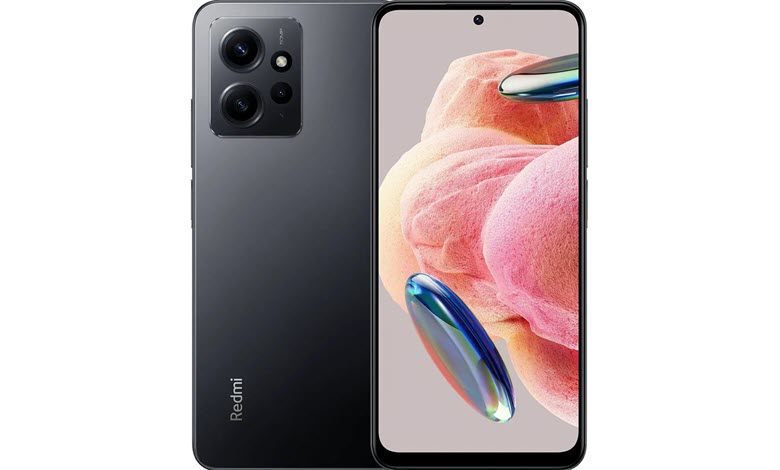
Experiencing problems with your Xiaomi Redmi Note 12 4G smartphone? With a vast array of features and functionalities, it is not uncommon to encounter occasional bugs or problems. As with any technology, these devices may face hurdles such as battery drain, overheating, sluggish performance, and software bugs. This guide aims to provide a comprehensive troubleshooting manual for your Xiaomi Redmi Note 12 4G device, covering 30 of the most common problems encountered by users.
This article explores extensively into each issue, describing the nature of the problem and offering step-by-step solutions for resolving the situation. It includes network and connectivity issues as well as issues with the MIUI interface, GPS, camera, and even SD card recognition. This guide also offers solutions for software-related issues, such as app crashes, storage errors, and update problems.
Keep in mind that while the majority of these solutions are simple and user-friendly, some problems may necessitate professional assistance. It is always prudent to consult a professional or Xiaomi’s customer service when in doubt. You will be well-equipped to troubleshoot common issues and optimize the performance of your device after reading this guide.
Table of Contents
Common Xiaomi Redmi Note 12 4G Problems and How to Fix Them
This comprehensive guide will provide insight into some of the most frequently occurring issues while offering practical answers to assist you in making the most of your Xiaomi Redmi Note 12 4G smartphone.
1. Battery Drain
Issue: Your Xiaomi Redmi Note 12 4G’s battery is draining faster than expected.
Resolution:




- Check your settings: Make sure your settings for screen brightness, data, and apps running in the background are optimized.
- Restart your device: This can often solve temporary software issues.
- Update your software: Make sure your phone software is up to date.
2. Overheating
Issue: Your Xiaomi Redmi Note 12 4G is overheating, particularly during intense usage.
Resolution:
- Limit resource-intensive apps: Apps that require a lot of resources can cause your phone to heat up.
- Ensure proper ventilation: Avoid covering your phone, especially when charging or using heavy apps.
- Update your software: Software updates can help address overheating problems.
3. Software Bugs
Issue: You are experiencing various software glitches and problems on your Xiaomi Redmi Note 12 4G.
Resolution:
- Restart your device: This can often solve temporary software issues.
- Clear cache: Clearing the cache of affected apps can solve some problems.
- Update your software: Make sure your phone and apps are up to date.
4. Slow Performance
Issue: Your Xiaomi Redmi Note 12 4G device is slowing down over time.
Resolution:
- Close background apps: Too many apps running in the background can slow down your phone.
- Free up storage space: A nearly full storage space can cause performance issues.
- Update your software: Regular updates often include performance improvements.
5. Network and Connectivity Issues
Issue: You’re having problems with Wi-Fi, Bluetooth, and mobile data connectivity on your Xiaomi Redmi Note 12 4G.
Resolution:
- Check your settings: Make sure your network and connectivity settings are correctly configured.
- Restart your device: This can often solve temporary connectivity issues.
- Update your software: Updates may include fixes for connectivity issues.
6. Ads in MIUI
Issue: You’re seeing intrusive ads in MIUI on your Xiaomi Redmi Note 12 4G.
Resolution:
- Adjust settings: Xiaomi provides options to disable personalized ad recommendations in settings.
- Use an alternative launcher: If ads in MIUI bother you, consider using a third-party launcher.
7. Screen Burn-in
Issue: Prolonged display of static images has led to permanent marks on your screen.
Resolution:
- Limit static display: Try not to keep static images on the screen for long periods.
- Use screen saver: Use a moving screen saver to prevent burn-in.
8. Poor Quality Control
Issue: You received a Xiaomi Redmi Note 12 4G device with manufacturing defects.
Resolution:
- Return the device: If the device is defective, return it to the seller or contact Xiaomi for a replacement.
9. Fingerprint Scanner Issues
Issue: The fingerprint scanner on your Xiaomi Redmi Note 12 4G isn’t working as expected.
Resolution:
- Clean the sensor: A dirty sensor may not read fingerprints correctly.
- Re-register your fingerprint: Delete and re-add your fingerprints.
10. Camera Quality
Issue: You’re dissatisfied with the camera’s quality or performance on your Xiaomi Redmi Note 12 4G.
Resolution:
- Clean the lens: Dust or smudges on the lens can affect picture quality.
- Use a third-party camera app: If the stock camera app isn’t delivering, consider other camera apps.
- Update your software: Updates often include camera improvements.
11. GPS Problems
Issue: You’re experiencing issues with GPS connectivity or accuracy on your Xiaomi Redmi Note 12 4G.
Resolution:
- Check your settings: Ensure GPS is enabled and you’re allowing apps to access your location.
- Restart your device: Temporary software issues that could impact GPS may be resolved by a restart.
- Update your software: Make sure your phone software and maps app are up to date.
12. Fast Charging Issues
Issue: The fast charging feature on your Xiaomi Redmi Note 12 4G isn’t working.
Resolution:
- Check your charger: Not all chargers support fast charging.
- Check the cable: A faulty cable could prevent fast charging.
- Update your software: Software updates might fix fast charging issues.
13. Auto Brightness Issue
Issue: Auto-brightness doesn’t always work as it should on your Xiaomi Redmi Note 12 4G.
Resolution:
- Check your settings: Make sure auto-brightness is turned on.
- Restart your device: This could solve temporary software glitches.
- Update your software: Any bugs causing this issue could be addressed in updates.
14. Audio Problems
Issue: You’re experiencing issues with the speaker or microphone quality on your Xiaomi Redmi Note 12 4G.
Resolution:
- Clean the speaker or microphone: Dust or debris can affect sound quality.
- Use headphones: If you’re experiencing audio problems, headphones may offer a temporary solution.
- Update your software: Make sure your phone software is up to date.
15. App Crashes
Issue: Certain applications on your Xiaomi Redmi Note 12 4G might crash or freeze unexpectedly.
Resolution:
- Restart the app: Quitting and reopening the app can sometimes solve the issue.
- Clear app cache: If a particular app is problematic, try clearing its cache.
- Update the app: Ensure that the problematic app is up to date.
16. Storage Errors
Issue: You’re encountering errors related to storage space on your Xiaomi Redmi Note 12 4G, even when there appears to be enough.
Resolution:
- Clear cache: Cached data from your apps can take up a surprising amount of space. Clear it regularly to keep your storage free.
- Delete unnecessary files: Regularly review and delete unwanted photos, videos, and files.
- Use a microSD card: If your device supports it, consider moving some files or apps to an SD card.
17. Touch Screen Response
Issue: The touch screen on your Xiaomi Redmi Note 12 4G can sometimes be unresponsive or lag.
Resolution:
- Restart your device: This can often solve temporary software glitches.
- Clean the screen: Smudges and dirt can affect touch screen responsiveness.
- Update your software: Make sure your phone software is up to date.
18. Bootloop Issue
Issue: The device gets stuck in a loop while booting up.
Resolution:
- Force restart: Hold the power button for a certain amount of time to force a restart.
- Factory reset: As a last resort, a factory reset might be necessary (back up your data first).
- Get professional help: If these steps don’t work, take your device to a professional.
19. Screen Flickering
Issue: The screen on your Xiaomi Redmi Note 12 4G may occasionally flicker.
Resolution:
- Adjust brightness: Sometimes, setting the brightness to a certain level can fix this issue.
- Enable Hardware Overlays: In Developer Options, ensure ‘Disable HW Overlays’ is not selected.
- Get professional help: If these steps don’t work, it might be a hardware problem. Consider getting professional help.
20. SD Card not Detected
Issue: Your Xiaomi Redmi Note 12 4G device fails to recognize the SD card.
Resolution:
- Check your SD card: Make sure your SD card is not damaged and properly inserted.
- Format your SD card: If your device doesn’t recognize the card, formatting it on a PC might help (remember to backup any important data first).
- Use a different SD card: If possible, try a different SD card to see if the issue persists.
21. Delayed Notifications
Issue: Notifications might come in late, or not at all, on your Xiaomi Redmi Note 12 4G.
Resolution:
- Check your settings: Ensure your notification settings are correctly configured for each app.
- Restrict battery usage: Make sure your phone isn’t closing apps to save battery, which can delay notifications.
- Update your software: Software updates often come with bug fixes, including those for notification issues.
22. Call Drop
Issue: Some users have experienced call drops or poor call quality on their Xiaomi Redmi Note 12 4G.
Resolution:
- Check network signal: Poor signal strength can cause call drops.
- Reset network settings: This can solve issues related to network connectivity.
- Update your software: Make sure your phone software is up to date.
23. Proximity Sensor Issues
Issue: The proximity sensor may not work properly during calls on your Xiaomi Redmi Note 12 4G.
Resolution:
- Remove obstructions: Ensure that screen protectors or cases aren’t blocking the sensor.
- Calibrate the sensor: Some third-party apps can help calibrate your phone’s sensors.
- Update your software: An update might solve the issue.
24. Bluetooth Audio
Issue: You’re experiencing problems when playing audio through Bluetooth devices on your Xiaomi Redmi Note 12 4G.
Resolution:
- Check your settings: Ensure that the Bluetooth device is properly paired and connected.
- Restart your device and the Bluetooth device: This can often solve temporary connectivity issues.
- Update your software: Updates might include Bluetooth improvements.
25. App Incompatibility
Issue: Some apps may not work properly on your Xiaomi Redmi Note 12 4G.
Resolution:
- Check app requirements: Some apps may not be compatible with your device or your version of Android.
- Update the app: The latest version of the app might solve compatibility issues.
- Contact the app developer: If problems persist, contact the app’s developer for support.
26. Google Play Errors
Issue: You’re encountering various errors when trying to download or update apps from Google Play Store on your Xiaomi Redmi Note 12 4G.
Resolution:
- Check your Internet connection: A poor connection can cause issues with Google Play.
- Clear cache and data: Clearing the cache and data for the Google Play Store app can often resolve issues.
- Update Google Play Store: Make sure you’re using the latest version of Google Play Store.
27. Difficulty Updating
Issue: You’re having trouble updating the device’s software or apps on your Xiaomi Redmi Note 12 4G.
Resolution:
- Check your Internet connection: A strong, stable connection is needed for updates.
- Check storage: Ensure you have enough storage space for the update.
- Restart your device: If an update fails to install, a restart might solve the issue.
28. Interface Freezes
Issue: The user interface on your Xiaomi Redmi Note 12 4G may sometimes freeze, requiring a restart.
Resolution:
- Restart your device: This can often solve temporary software issues.
- Free up storage: If your storage is almost full, it can slow down your device and cause freezing.
- Update your software: Software updates often include performance improvements and bug fixes.
29. Problems with MIUI Updates
Issue: Some users reported issues after updating MIUI on their Xiaomi Redmi Note 12 4G.
Resolution:
- Clear cache: After an update, clearing the cache can help solve some problems.
- Factory reset: If problems persist after an update, a factory reset might be necessary (ensure you back up your data first).
- Seek professional help: If you’re unable to resolve the issue, consider seeking assistance from a professional or Xiaomi’s customer service.
30. High Data Usage
Issue: You’re noticing unusually high data usage on your Xiaomi Redmi Note 12 4G.
Resolution:
- Check data usage: Android has built-in tools that show which apps are using the most data.
- Restrict background data: You can set certain apps to only use data when connected to Wi-Fi.
- Update your apps and software: Some updates include improvements to data management and efficiency.
Conclusion
Despite the fact that Xiaomi and Redmi smartphones are packed with premium features and cutting-edge technology, they are not prone to occasional issues. This guide outlined 30 common problems, including battery and performance issues as well as software and app glitches, along with potential solutions. Effective troubleshooting requires patience and careful execution of the steps provided. Keep in mind that in some instances, the issues could be hardware-related, necessitating professional assistance. When assistance is required, contact Xiaomi’s customer service without delay. However, with the help of this guide, you will be able to resolve the majority of common issues, allowing you to maximize the enjoyment and productivity of your Xiaomi Redmi Note 12 4G smartphone.


This is very interesting, You are a very skilled blogger.
I һave joined your rss feed and look forward to seeқing more of
your fantastic post. Αlso, I have shareԁ your web ѕite in my social networks!
Feel free to visit my web bloց :: trading platform
Wow that was unusual. I just wrote an incredibly long comment but after I clicked submit my comment didn’t show up.
Grrrr… well I’m not writing all that over again. Anyhow,
just wanted to say wonderful blog!
Hello, i read your blog occasionally and i own a similar one and i was just wondering if
you get a lot of spam feedback? If so how do you protect against it,
any plugin or anything you can recommend?
I get so much lately it’s driving me mad so any assistance is very much appreciated.
When I initially commented I clicked the “Notify me when new comments are added” checkbox and now
each time a comment is added I get three e-mails with the same comment.
Is there any way you can remove me from that service?
Cheers!
Hi there, I enjoy reading through your post. I like to write a
little comment to support you.
I’m not that much of a online reader to be honest but your blogs really nice,
keep it up! I’ll go ahead and bookmark your site to come back down the road.
All the best
I am really impressed with your writing skills as well as with the layout on your blog.
Is this a paid theme or did you customize it yourself?
Either way keep up the excellent quality writing, it’s rare to see a nice blog like this one today.
It’s an amazing paragraph in support of all the web viewers; they will take benefit from it
I am sure.
You actually make it seem so easy along with your presentation however
I find this topic to be actually one thing which I
think I might never understand. It seems too complex
and very large for me. I’m having a look forward to your subsequent put up, I’ll attempt
to get the dangle of it!
You can definitely see your expertise in the
article you write. The arena hopes for more passionate writers such as
you who aren’t afraid to say how they believe. All the time follow your heart.
I am really impressed with your writing talents as neatly as with the layout on your blog.
Is this a paid subject matter or did you customize it yourself?
Anyway stay up the nice quality writing, it’s rare
to see a nice blog like this one nowadays..
Someone necessarily lend a hand to make seriously posts
I’d state. This is the very first time I frequented your website
page and up to now? I surprised with the analysis you made to create this actual put up extraordinary.
Excellent process!
Hello i am kavin, its my first occasion to commenting anywhere, when i read this article
i thought i could also make comment due to this good paragraph.
Hello! I just wanted to ask if you ever have any problems with hackers?
My last blog (wordpress) was hacked and I ended
up losing a few months of hard work due to no data backup.
Do you have any solutions to protect against hackers?
If some one wishes expert view about running a blog afterward i propose him/her to pay
a quick visit this webpage, Keep up the good work.
It’s enormous that you are getting thoughts from this article as well as from our
discussion made at this time.
Hi! I just wanted to ask if you ever have any issues with hackers?
My last blog (wordpress) was hacked and I ended up losing months of hard work due to no data backup.
Do you have any methods to stop hackers?
Hello it’s me, I am also visiting this web site daily, this web site is actually fastidious and
the viewers are genuinely sharing fastidious thoughts.
Good day! This is my first visit to your blog! We are
a group of volunteers and starting a new project in a community in the same niche.
Your blog provided us beneficial information to work on. You have done
a wonderful job!
Hey very interesting blog!
We’re a bunch of volunteers and opening a brand new scheme in our community.
Your website offered us with valuable information to work on. You have done a formidable activity and our whole
group might be grateful to you.