

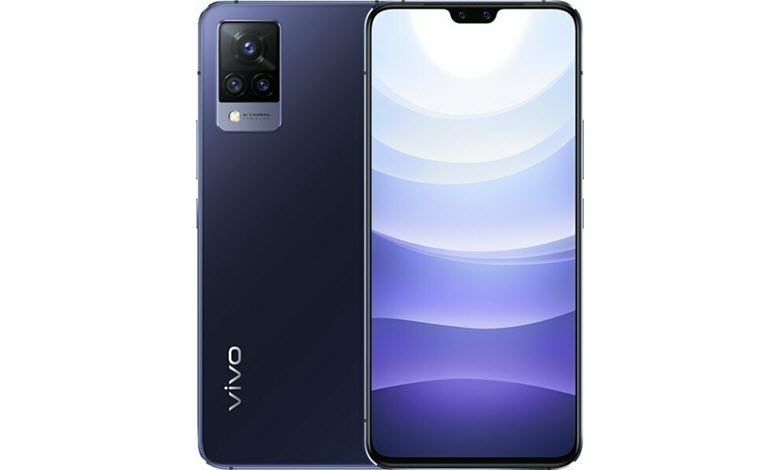
The vivo S9 is a popular smartphone, known for its sleek look, strong performance, and innovative features. However, like all gadgets, it can sometimes run into issues that can be a bit frustrating for users. In this comprehensive guide, we’ll give you easy-to-follow solutions to fix common problems that vivo S9 users often face. Whether you’re dealing with a battery that drains too quickly, problems with connecting to a network, apps not working properly, or other concerns, this guide is here to help you troubleshoot your vivo S9 effectively. Our goal is to help you quickly get your device back to working as it should. Whether you’re dealing with a screen issue, a connectivity problem, or a battery that’s draining too quickly, this article provides step-by-step methods to solve these issues and improve your experience with the vivo S9.
Table of Contents
Common vivo S9 Problems and How to Fix Them
This comprehensive guide will offer insights into some of the most common problems, while providing practical solutions to help you maximize the potential of your vivo S9 smartphone.
1. Slow Performance
Issue: Your vivo S9 is experiencing slow performance, lag, or unresponsiveness.
Resolution:
- Close Background Apps: Make sure unnecessary apps aren’t running in the background.
- Clear Cache: Regularly clear the cache of individual apps and system cache.
- Software Update: Keep your device updated with the latest software for optimal performance.
2. WiFi Connectivity Issue
Issue: You’re having problems connecting to WiFi on your vivo S9.
Resolution:




- Restart Your Router: Sometimes, restarting your router can resolve connectivity issues.
- Check WiFi Settings: Ensure your WiFi is turned on, and the network you’re trying to connect to is saved and within range.
- Software Update: Regularly update your device’s software. New updates often contain fixes for connectivity issues.
3. Poor Call Quality
Issue: You’re experiencing poor call quality on your vivo S9.
Resolution:
- Check Signal Strength: Poor call quality can often be a result of low signal strength. Ensure that you’re in an area with good coverage.
- Restart Your Phone: Sometimes, simply restarting your device can fix this issue.
- Update Your Software: Make sure your phone’s software is up to date. New updates often contain fixes for call and network-related issues.
4. Insufficient Storage
Issue: You’re running out of storage on your vivo S9.
Resolution:
- Delete Unnecessary Files: Regularly check your gallery, downloads folder, and other storage areas for files you don’t need.
- Use Cloud Storage: Consider backing up photos, videos, and other large files to a cloud storage service. Uninstall Unused Apps: If there are apps on your device you no longer use, consider uninstalling them to free up space.
5. Device Overheating
Issue: Your vivo S9 is overheating during use.
Resolution:
- Limit Heavy Usage: Intense activities such as gaming or streaming can cause your device to overheat. Give your device regular breaks during such activities.
- Check for Software Updates: Overheating can sometimes be a symptom of software issues. Regular updates often include bug fixes that can resolve this.
- Use in Cool Environment: Keep your device out of direct sunlight and don’t use it in overly hot environments.
6. App Crashes
Issue: Apps on your vivo S9 are crashing frequently.
Resolution:
- Update Your Apps: Ensure your apps are all updated to their latest versions.
- Restart Your Device: A simple restart can often resolve many problems.
- Reinstall the App: If a particular app is causing trouble, try uninstalling and reinstalling it.
7. Bluetooth Connectivity Issue
Issue: Your vivo S9 is having problems connecting to Bluetooth devices.
Resolution:
- Check Bluetooth Settings: Make sure Bluetooth is turned on, and your device is discoverable.
- Restart Bluetooth: Turn off Bluetooth, wait a moment, then turn it back on.
- Pairing Mode: Ensure that the device you’re trying to connect to is in pairing mode.
8. Fingerprint Scanner Not Working
Issue: The fingerprint scanner on your vivo S9 isn’t working properly.
Resolution:
- Clean the Scanner: Dust or smudges can affect the scanner. Clean the scanner and your finger before use.
- Re-register Your Fingerprint: Delete and re-register your fingerprint in your device settings.
- Software Update: Make sure your device’s software is up-to-date.
9. Screen Freezing
Issue: The screen on your vivo S9 is frequently freezing.
Resolution:
- Close Apps: Close any unnecessary apps running in the background.
- Restart Your Device: If your screen freezes, try restarting your device.
- Software Update: Regular updates often include bug fixes which can resolve screen freezing issues.
10. Poor Camera Quality
Issue: You’re not satisfied with the camera quality on your vivo S9.
Resolution:
- Clean the Lens: Dust or smudges can affect picture quality, so regularly clean your camera lens.
- Use Proper Lighting: Good lighting is crucial for high-quality photos. Make sure the subject of your photo is well-lit.
- Update Your Software: Updates often include camera improvements.
11. Unexpected Device Shutdowns
Issue: Your vivo S9 is shutting down unexpectedly.
Resolution:
- Battery Check: Your battery may be faulty or near the end of its lifespan. Check your battery health in the settings.
- Software Update: Ensure your device’s software is up to date as some updates fix system bugs that cause shutdowns.
- Factory Reset: If the problem persists, backup your data and consider doing a factory reset. Be sure to backup your data first.
12. Inaccurate GPS
Issue: The GPS on your vivo S9 is not accurate or not working.
Resolution:
- Check GPS Settings: Ensure your location services are on and set to High Accuracy mode.
- Restart Your Device: If your GPS is acting up, a restart may help.
- Software Update: Regularly update your software, as some updates are designed to improve GPS accuracy.
13. Phone Isn’t Charging
Issue: Your vivo S9 isn’t charging when connected to power.
Resolution:
- Check Your Charging Cable and Adapter: Ensure they are in good condition and working with other devices.
- Clean the Charging Port: Dust and debris in the port can prevent proper contact.
- Try a Different Power Source: If possible, try charging from a different outlet or computer port.
14. Not Receiving Notifications
Issue: You’re not receiving app notifications on your vivo S9.
Resolution:
- Check App Notification Settings: Ensure notifications are enabled for the specific apps.
- Restart Your Device: Sometimes, a simple restart can fix notification issues.
- Software Update: Regular updates often include fixes for notification issues.
15. Mobile Data Not Working
Issue: You’re having trouble connecting to mobile data on your vivo S9.
Resolution:
- Check Your Data Limit: You might have reached your mobile data limit for the period.
- Check Network Settings: Make sure you have the right APN settings for your carrier.
- Restart Your Device: This can sometimes fix network connectivity issues.
16. Difficulty Sending/Receiving SMS
Issue: You’re having problems sending or receiving SMS on your vivo S9.
Resolution:
- Check Signal: Ensure you have good signal strength as SMS relies on cellular network.
- Check Message Center Number: Make sure the SMS service center number in your message settings is correct.
- Software Update: Regularly update your software as some updates come with fixes for messaging problems.
17. Device Not Turning On
Issue: Your vivo S9 isn’t turning on.
Resolution:
- Charge Your Device: Your battery may be completely drained. Try charging your device.
- Hard Reset: If the device still doesn’t turn on, try a hard reset (usually holding the power button and volume down button).
- Professional Assistance: If the problem persists, contact Realme customer service or a professional repair service.
18. Problems with Video Playback
Issue: You’re experiencing problems when playing videos on your vivo S9.
Resolution:
- Check Your App: Make sure your video app is updated and functioning correctly.
- Update Your Software: Regular software updates often include bug fixes for video playback issues.
- Check Your Network: If you’re streaming video, a weak network signal can cause problems.
19. Difficulty Syncing Accounts
Issue: You’re having trouble syncing your accounts on your vivo S9.
Resolution:
- Check Your Internet Connection: Ensure you have a stable internet connection for syncing.
- Check Sync Settings: Ensure sync is enabled in your account settings.
- Software Update: Regular updates often contain fixes for account syncing issues.
20. Phone Gets Hot During Charging
Issue: Your vivo S9 gets hot while charging.
Resolution:
- Use Original Charger: Make sure you’re using the original charger and cable that came with your device.
- Avoid Usage While Charging: Try not to use your device while it’s charging to avoid overheating.
- Check for Software Updates: Sometimes, overheating during charging can be due to software issues.
21. Voice Assistant Activation Issues
Issue: You’re having trouble activating or using the voice assistant on your vivo S9.
Resolution:
- Check Assistant Settings: Ensure the voice assistant is enabled and properly set up in your settings.
- Pronunciation: Make sure you’re saying the wake word correctly and clearly.
- Software Update: Regular updates often include improvements to voice assistant functionality.
22. Device Isn’t Vibrating
Issue: Your vivo S9 isn’t vibrating for calls, messages, or notifications.
Resolution:
- Check Vibration Settings: Make sure vibration is turned on in your settings.
- Restart Your Device: A simple restart can often fix minor issues like this.
- Software Update: Regularly update your software as some updates come with vibration bug fixes.
23. Problem with Audio Output
Issue: The audio output on your vivo S9 isn’t working properly.
Resolution:
- Check Volume Settings: Ensure the volume isn’t muted or set too low.
- Check Audio Output Source: If you’re connected to Bluetooth or have headphones plugged in, the audio might be playing there.
- Restart Your Device: If the problem persists, try restarting your device.
24. Difficulty Updating Device Software
Issue: You’re having trouble updating the software on your vivo S9.
Resolution:
- Check Internet Connection: Ensure you have a stable internet connection for the update.
- Check Device Storage: Make sure you have enough storage space for the update.
- Factory Reset: If the problem persists, consider doing a factory reset (after backing up your data).
25. Microphone Isn’t Working Properly
Issue: The microphone on your vivo S9 isn’t working properly during calls or voice recording.
Resolution:
- Check Microphone Opening: Make sure the microphone isn’t blocked by dust or a phone case.
- Check Software Settings: Ensure the right permissions are given to apps that use the microphone.
- Restart Your Device: If the problem persists, try restarting your device.
26. Trouble Pairing with NFC
Issue: You’re having trouble pairing your vivo S9 with an NFC device.
Resolution:
- Check NFC Settings: Ensure NFC is turned on in your device settings.
- Positioning: Ensure your device is close enough to the NFC tag or device.
- Software Update: Regular updates often include improvements and fixes for NFC functionality.
27. Screen Brightness Issues
Issue: The screen brightness on your vivo S9 isn’t adjusting properly.
Resolution:
- Check Brightness Settings: Make sure automatic brightness is on in your display settings.
- Reset Settings: If the problem persists, try resetting your settings.
- Software Update: Regularly update your software as some updates come with bug fixes for screen brightness issues.
28. Difficulty Connecting to a Wi-Fi Network
Issue: Your vivo S9 is having difficulty connecting to a specific Wi-Fi network.
Resolution:
- Check Wi-Fi Credentials: Make sure you’re entering the correct network name and password.
- Restart Router: If other devices are also having trouble, it might be an issue with the router.
- Forget Network: In your Wi-Fi settings, forget the network and then reconnect.
29. Apps Taking Too Long to Load
Issue: Apps on your vivo S9 are taking a long time to load.
Resolution:
- Close Background Apps: Too many apps running in the background can slow down your device.
- Clear App Cache: Go to settings and clear cache for the slow app(s).
- Update Your Apps and Software: Ensure your apps and device software are up to date.
30. Difficulty Receiving Calls
Issue: You’re having trouble receiving calls on your vivo S9.
Resolution:
- Check Do Not Disturb Settings: Make sure Do Not Disturb mode isn’t enabled.
- Check Signal Strength: Poor signal strength can prevent calls from coming through.
- Restart Your Device: A simple restart can often fix call issues.
Conclusion
The vivo S9 is an impressive smartphone that offers great value for its price. However, it’s essential to be aware of the potential issues that can arise and know how to tackle them effectively. In this article, we discussed 30 common problems faced by vivo S9 users and provided practical solutions to overcome them. By following these troubleshooting steps, you can enhance your device’s performance, resolve connectivity issues, optimize battery life, and enjoy a seamless user experience with your vivo S9.
Remember to stay updated with the latest software releases and consult Realme support or service centers for further assistance if required.




I usеd to be recommended this web site by my cousin. I am no longer certain whether or not this
publish іs written by way ߋf him as nobody else understand such special
approximately my trouble. Υoս’re incгediblе! Thank you!
my page :: digital banking
Wonderful, what a blog it is! This webpage provides valuable
data to us, keep it up.
Thanks for your personal marvelous posting! I seriously
enjoyed reading it, you can be a great author. I
will be sure to bookmark your blog and may come back in the future.
I want to encourage you continue your great job, have
a nice holiday weekend!
Outstanding quest there. What happened after? Good luck!
Wow, awesome blog layout! How long have you been blogging for?
you made blogging look easy. The overall look of your site is fantastic, let alone the content!
Excellent site you have here but I was wondering if you knew of
any discussion boards that cover the same topics discussed in this article?
I’d really like to be a part of group where I can get feedback from other knowledgeable individuals that share the same interest.
If you have any suggestions, please let me know. Kudos!
Hey there I am so excited I found your webpage, I really
found you by accident, while I was searching on Bing for something else,
Anyways I am here now and would just like to say cheers for a tremendous post and a all round entertaining blog (I also love the theme/design), I don’t have time to look over it all
at the moment but I have book-marked it and also added in your RSS
feeds, so when I have time I will be back to read a great deal more, Please do keep up the superb work.
That is a very good tip particularly to those new to the blogosphere.
Short but very accurate info… Thank you for sharing this one.
A must read post!
My brother suggested I might like this website.
He was totally right. This submit truly made my day. You cann’t consider simply
how much time I had spent for this information! Thank you!
日本は、技術革新において世界的に注目されています。特に、自動車産業では、ホンダなどの大手企業が世界市場をリードしており、新車やハイブリッド車など、さまざまな環境に配慮した技術が導入しています。自動車産業の進展により、安全性が大きく向上し、利用者にとってより良い移動手段が提供されています。
バイクの所有は、車両保険といった日本特有の制度に密接に関連しており、日本の交通システムは、これらの制度に従い、交通安全を確保しています。さらに、事故時の対応の普及が進んでおり、事故やトラブルの際に迅速に対応できるようになっています。これにより、日本国内では、信頼性が提供され、安全運転の問題にも積極的に取り組んでいます。
一方で、人口減少という重要な問題が日本において進行しています。高齢者の増加に伴い、介護分野での需要が急増し、介護士の不足が深刻な問題となっています。このため、看護師求人が増加しており、さらに医療従事者のキャリア支援の需要も高まっています。政府は、新しい介護システムを活用した支援策を導入し、高齢者への支援を強化しています。
また、健康の分野では、治療法が急速に進化し、健康管理に対する対応が向上しています。日本は、先進的な医療を提供し、特に高齢者医療において多くの技術革新が導入されています。さらに、医師の専門性を高めるため、医療研修が重要視され、技術研修の充実が求められています。
社会的な課題に対して、日本のボランティア団体は積極的に取り組んでおり、福祉活動を推進しています。これにより、地域住民や子どもに対する支援が強化され、寄付活動が日常的に行われています。福祉活動も重要な役割を果たしており、特に日本では、台風などの自然災害時に、地域住民が迅速に対応し、避難所の設営が行われています。
さらに、情報技術が進展する中で、eスポーツなどの新たな娯楽の形態が広がり、フィットネスへの関心が高まっています。日本では、家庭用トレーニングの利用が増加し、美しい体作りに向けたライフスタイルが注目されています。また、サプリメントが重要な役割を果たし、ボディメイクのためのアイテムが多く流通しています。
ファッションや美容においても、日本は、常に新しいトレンドを追い求めています。靴においては、トレンドアイテムが注目され、特にカジュアルファッションが人気です。美容業界では、ヘアケアが進化し、美容整形などのサービスも充実しています。ネイルアートやジェルネイルもトレンドとなり、ネイルサロンが活況を呈しています。
このように、日本社会は、進展とともに進化しており、文化が密接に関わり合っています。未来に向けて、進化する社会の実現に向けた取り組みが進んでおり、これらの挑戦を乗り越えるための準備が整いつつあります。
現代日本は、最先端のテクノロジーにおいて世界的に有名されています。特に、自動車産業では、ホンダなどの大手企業が世界市場をリードしており、新車や自動運転車など、さまざまな革新技術が進化しています。自動車産業の進展により、安全性が大きく向上し、ドライバーにとってより良い移動手段が提供されています。
バイクの所有は、自動車税といった日本特有の制度に密接に関連しており、日本の運転者は、これらの制度に従い、車両の管理を確保しています。さらに、ドライブレコーダーの普及が進んでおり、事故やトラブルの際に迅速に対応できるようになっています。これにより、国内では、安心感が提供され、社会的責任の問題にも積極的に取り組んでいます。
一方で、少子高齢化という社会的課題が日本において進行しています。高齢者の増加に伴い、介護分野での需要が急増し、介護士の不足が深刻な問題となっています。このため、介護職の募集が増加しており、さらに介護職の再教育の需要も高まっています。政府は、AI技術を活用した支援策を導入し、患者への支援を強化しています。
また、医療の分野では、医療機器が急速に進化し、疾病に対する対応が向上しています。日本は、高い医療水準を提供し、特に高齢者医療において多くの革新が導入されています。さらに、医師の専門性を高めるため、医療資格取得が重要視され、技術研修の充実が求められています。
社会的な課題に対して、日本のボランティア団体は積極的に取り組んでおり、環境保護を推進しています。これにより、地域住民や高齢者に対する支援が強化され、社会貢献が日常的に行われています。福祉活動も重要な役割を果たしており、特に日本では、地震などの自然災害時に、支援団体が迅速に対応し、避難所の設営が行われています。
さらに、情報技術が進展する中で、オンラインゲームなどの新たな娯楽の形態が広がり、フィットネスへの関心が高まっています。日本では、家庭用トレーニングの利用が増加し、美しい体作りに向けたライフスタイルが注目されています。また、サプリメントが重要な役割を果たし、健康的な食生活のためのアイテムが多く流通しています。
ファッションや美容においても、日本は、常に新しいトレンドを追い求めています。アクセサリーにおいては、ファッションデザイナーが注目され、特にフォーマルスタイルが人気です。美容業界では、メイクが進化し、脱毛などのサービスも充実しています。ネイルアートやジェルネイルもトレンドとなり、ネイルサロンが活況を呈しています。
このように、現代日本は、課題とともに進化しており、文化が密接に関わり合っています。未来に向けて、新しいライフスタイルの実現に向けた取り組みが進んでおり、これらの挑戦を乗り越えるための準備が整いつつあります。