

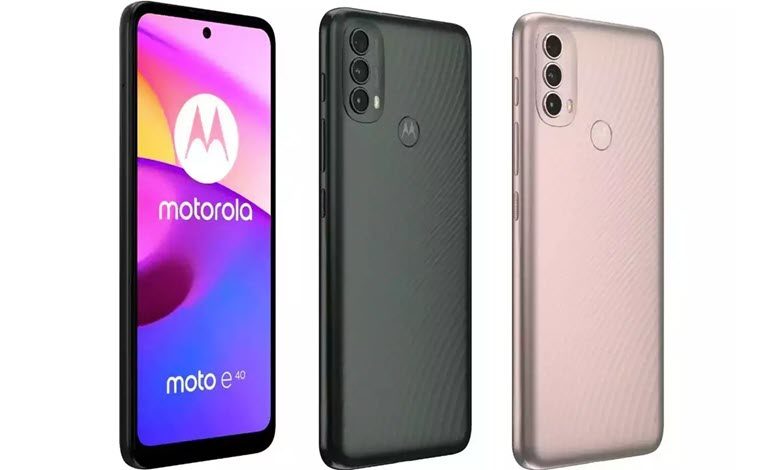
The Motorola Moto E40 is a popular smartphone, known for its sleek look, strong performance, and innovative features. However, like all gadgets, it can sometimes run into issues that can be a bit frustrating for users. In this comprehensive guide, we’ll give you easy-to-follow solutions to fix common problems that Motorola Moto E40 users often face. Whether you’re dealing with a battery that drains too quickly, problems with connecting to a network, apps not working properly, or other concerns, this guide is here to help you troubleshoot your Motorola Moto E40 effectively. Our goal is to help you quickly get your device back to working as it should. Whether you’re dealing with a screen issue, a connectivity problem, or a battery that’s draining too quickly, this article provides step-by-step methods to solve these issues and improve your experience with the Motorola Moto E40.
Table of Contents
Common Motorola Moto E40 Problems and How to Fix Them
This comprehensive guide will offer insights into some of the most common problems, while providing practical solutions to help you maximize the potential of your Motorola Moto E40 smartphone.
1. Slow Performance
Issue: Your Motorola Moto E40 is experiencing slow performance, lag, or unresponsiveness.
Resolution:
- Close Background Apps: Make sure unnecessary apps aren’t running in the background.
- Clear Cache: Regularly clear the cache of individual apps and system cache.
- Software Update: Keep your device updated with the latest software for optimal performance.
2. WiFi Connectivity Issue
Issue: You’re having problems connecting to WiFi on your Motorola Moto E40.
Resolution:


- Restart Your Router: Sometimes, restarting your router can resolve connectivity issues.
- Check WiFi Settings: Ensure your WiFi is turned on, and the network you’re trying to connect to is saved and within range.
- Software Update: Regularly update your device’s software. New updates often contain fixes for connectivity issues.
3. Poor Call Quality
Issue: You’re experiencing poor call quality on your Motorola Moto E40.
Resolution:
- Check Signal Strength: Poor call quality can often be a result of low signal strength. Ensure that you’re in an area with good coverage.
- Restart Your Phone: Sometimes, simply restarting your device can fix this issue.
- Update Your Software: Make sure your phone’s software is up to date. New updates often contain fixes for call and network-related issues.
4. Insufficient Storage
Issue: You’re running out of storage on your Motorola Moto E40.
Resolution:
- Delete Unnecessary Files: Regularly check your gallery, downloads folder, and other storage areas for files you don’t need.
- Use Cloud Storage: Consider backing up photos, videos, and other large files to a cloud storage service. Uninstall Unused Apps: If there are apps on your device you no longer use, consider uninstalling them to free up space.
5. Device Overheating
Issue: Your Motorola Moto E40 is overheating during use.
Resolution:
- Limit Heavy Usage: Intense activities such as gaming or streaming can cause your device to overheat. Give your device regular breaks during such activities.
- Check for Software Updates: Overheating can sometimes be a symptom of software issues. Regular updates often include bug fixes that can resolve this.
- Use in Cool Environment: Keep your device out of direct sunlight and don’t use it in overly hot environments.
6. App Crashes
Issue: Apps on your Motorola Moto E40 are crashing frequently.
Resolution:
- Update Your Apps: Ensure your apps are all updated to their latest versions.
- Restart Your Device: A simple restart can often resolve many problems.
- Reinstall the App: If a particular app is causing trouble, try uninstalling and reinstalling it.
7. Bluetooth Connectivity Issue
Issue: Your Motorola Moto E40 is having problems connecting to Bluetooth devices.
Resolution:
- Check Bluetooth Settings: Make sure Bluetooth is turned on, and your device is discoverable.
- Restart Bluetooth: Turn off Bluetooth, wait a moment, then turn it back on.
- Pairing Mode: Ensure that the device you’re trying to connect to is in pairing mode.
8. Fingerprint Scanner Not Working
Issue: The fingerprint scanner on your Motorola Moto E40 isn’t working properly.
Resolution:
- Clean the Scanner: Dust or smudges can affect the scanner. Clean the scanner and your finger before use.
- Re-register Your Fingerprint: Delete and re-register your fingerprint in your device settings.
- Software Update: Make sure your device’s software is up-to-date.
9. Screen Freezing
Issue: The screen on your Motorola Moto E40 is frequently freezing.
Resolution:
- Close Apps: Close any unnecessary apps running in the background.
- Restart Your Device: If your screen freezes, try restarting your device.
- Software Update: Regular updates often include bug fixes which can resolve screen freezing issues.
10. Poor Camera Quality
Issue: You’re not satisfied with the camera quality on your Motorola Moto E40.
Resolution:
- Clean the Lens: Dust or smudges can affect picture quality, so regularly clean your camera lens.
- Use Proper Lighting: Good lighting is crucial for high-quality photos. Make sure the subject of your photo is well-lit.
- Update Your Software: Updates often include camera improvements.
11. Unexpected Device Shutdowns
Issue: Your Motorola Moto E40 is shutting down unexpectedly.
Resolution:
- Battery Check: Your battery may be faulty or near the end of its lifespan. Check your battery health in the settings.
- Software Update: Ensure your device’s software is up to date as some updates fix system bugs that cause shutdowns.
- Factory Reset: If the problem persists, backup your data and consider doing a factory reset. Be sure to backup your data first.
12. Inaccurate GPS
Issue: The GPS on your Motorola Moto E40 is not accurate or not working.
Resolution:
- Check GPS Settings: Ensure your location services are on and set to High Accuracy mode.
- Restart Your Device: If your GPS is acting up, a restart may help.
- Software Update: Regularly update your software, as some updates are designed to improve GPS accuracy.
13. Phone Isn’t Charging
Issue: Your Motorola Moto E40 isn’t charging when connected to power.
Resolution:
- Check Your Charging Cable and Adapter: Ensure they are in good condition and working with other devices.
- Clean the Charging Port: Dust and debris in the port can prevent proper contact.
- Try a Different Power Source: If possible, try charging from a different outlet or computer port.
14. Not Receiving Notifications
Issue: You’re not receiving app notifications on your Motorola Moto E40.
Resolution:
- Check App Notification Settings: Ensure notifications are enabled for the specific apps.
- Restart Your Device: Sometimes, a simple restart can fix notification issues.
- Software Update: Regular updates often include fixes for notification issues.
15. Mobile Data Not Working
Issue: You’re having trouble connecting to mobile data on your Motorola Moto E40.
Resolution:
- Check Your Data Limit: You might have reached your mobile data limit for the period.
- Check Network Settings: Make sure you have the right APN settings for your carrier.
- Restart Your Device: This can sometimes fix network connectivity issues.
16. Difficulty Sending/Receiving SMS
Issue: You’re having problems sending or receiving SMS on your Motorola Moto E40.
Resolution:
- Check Signal: Ensure you have good signal strength as SMS relies on cellular network.
- Check Message Center Number: Make sure the SMS service center number in your message settings is correct.
- Software Update: Regularly update your software as some updates come with fixes for messaging problems.
17. Device Not Turning On
Issue: Your Motorola Moto E40 isn’t turning on.
Resolution:
- Charge Your Device: Your battery may be completely drained. Try charging your device.
- Hard Reset: If the device still doesn’t turn on, try a hard reset (usually holding the power button and volume down button).
- Professional Assistance: If the problem persists, contact Realme customer service or a professional repair service.
18. Problems with Video Playback
Issue: You’re experiencing problems when playing videos on your Motorola Moto E40.
Resolution:
- Check Your App: Make sure your video app is updated and functioning correctly.
- Update Your Software: Regular software updates often include bug fixes for video playback issues.
- Check Your Network: If you’re streaming video, a weak network signal can cause problems.
19. Difficulty Syncing Accounts
Issue: You’re having trouble syncing your accounts on your Motorola Moto E40.
Resolution:
- Check Your Internet Connection: Ensure you have a stable internet connection for syncing.
- Check Sync Settings: Ensure sync is enabled in your account settings.
- Software Update: Regular updates often contain fixes for account syncing issues.
20. Phone Gets Hot During Charging
Issue: Your Motorola Moto E40 gets hot while charging.
Resolution:
- Use Original Charger: Make sure you’re using the original charger and cable that came with your device.
- Avoid Usage While Charging: Try not to use your device while it’s charging to avoid overheating.
- Check for Software Updates: Sometimes, overheating during charging can be due to software issues.
21. Voice Assistant Activation Issues
Issue: You’re having trouble activating or using the voice assistant on your Motorola Moto E40.
Resolution:
- Check Assistant Settings: Ensure the voice assistant is enabled and properly set up in your settings.
- Pronunciation: Make sure you’re saying the wake word correctly and clearly.
- Software Update: Regular updates often include improvements to voice assistant functionality.
22. Device Isn’t Vibrating
Issue: Your Motorola Moto E40 isn’t vibrating for calls, messages, or notifications.
Resolution:
- Check Vibration Settings: Make sure vibration is turned on in your settings.
- Restart Your Device: A simple restart can often fix minor issues like this.
- Software Update: Regularly update your software as some updates come with vibration bug fixes.
23. Problem with Audio Output
Issue: The audio output on your Motorola Moto E40 isn’t working properly.
Resolution:
- Check Volume Settings: Ensure the volume isn’t muted or set too low.
- Check Audio Output Source: If you’re connected to Bluetooth or have headphones plugged in, the audio might be playing there.
- Restart Your Device: If the problem persists, try restarting your device.
24. Difficulty Updating Device Software
Issue: You’re having trouble updating the software on your Motorola Moto E40.
Resolution:
- Check Internet Connection: Ensure you have a stable internet connection for the update.
- Check Device Storage: Make sure you have enough storage space for the update.
- Factory Reset: If the problem persists, consider doing a factory reset (after backing up your data).
25. Microphone Isn’t Working Properly
Issue: The microphone on your Motorola Moto E40 isn’t working properly during calls or voice recording.
Resolution:
- Check Microphone Opening: Make sure the microphone isn’t blocked by dust or a phone case.
- Check Software Settings: Ensure the right permissions are given to apps that use the microphone.
- Restart Your Device: If the problem persists, try restarting your device.
26. Trouble Pairing with NFC
Issue: You’re having trouble pairing your Motorola Moto E40 with an NFC device.
Resolution:
- Check NFC Settings: Ensure NFC is turned on in your device settings.
- Positioning: Ensure your device is close enough to the NFC tag or device.
- Software Update: Regular updates often include improvements and fixes for NFC functionality.
27. Screen Brightness Issues
Issue: The screen brightness on your Motorola Moto E40 isn’t adjusting properly.
Resolution:
- Check Brightness Settings: Make sure automatic brightness is on in your display settings.
- Reset Settings: If the problem persists, try resetting your settings.
- Software Update: Regularly update your software as some updates come with bug fixes for screen brightness issues.
28. Difficulty Connecting to a Wi-Fi Network
Issue: Your Motorola Moto E40 is having difficulty connecting to a specific Wi-Fi network.
Resolution:
- Check Wi-Fi Credentials: Make sure you’re entering the correct network name and password.
- Restart Router: If other devices are also having trouble, it might be an issue with the router.
- Forget Network: In your Wi-Fi settings, forget the network and then reconnect.
29. Apps Taking Too Long to Load
Issue: Apps on your Motorola Moto E40 are taking a long time to load.
Resolution:
- Close Background Apps: Too many apps running in the background can slow down your device.
- Clear App Cache: Go to settings and clear cache for the slow app(s).
- Update Your Apps and Software: Ensure your apps and device software are up to date.
30. Difficulty Receiving Calls
Issue: You’re having trouble receiving calls on your Motorola Moto E40.
Resolution:
- Check Do Not Disturb Settings: Make sure Do Not Disturb mode isn’t enabled.
- Check Signal Strength: Poor signal strength can prevent calls from coming through.
- Restart Your Device: A simple restart can often fix call issues.
Conclusion
The Motorola Moto E40 is an impressive smartphone that offers great value for its price. However, it’s essential to be aware of the potential issues that can arise and know how to tackle them effectively. In this article, we discussed 30 common problems faced by Motorola Moto E40 users and provided practical solutions to overcome them. By following these troubleshooting steps, you can enhance your device’s performance, resolve connectivity issues, optimize battery life, and enjoy a seamless user experience with your Motorola Moto E40.
Remember to stay updated with the latest software releases and consult Realme support or service centers for further assistance if required.



ขอบคุณสำหรับ บทความ มีประโยชน์ ในเรื่อง
การเลือกพวงหรีด
ลองอ่านดูแล้ว รู้สึกว่า เคลียร์ดี
เลย
ทำให้คนที่อ่าน รู้ เรื่อง รูปแบบพวงหรีด ได้ดีขึ้น
ก่อนหน้านี้ ไม่เคยรู้ เรื่อง
พวงหรีด จริงๆ
พอได้อ่านบทความนี้
ทำให้เข้าใจขึ้น
พอดี กำลังมองหา พวงหรีดดอกไม้
อยู่เหมือนกัน
คิดว่า เนื้อหานี้ ใช้ได้จริง
สำหรับคนที่ กำลังดู พวงหรีด บทความนี้ตอบโจทย์
Also visit my homepage; ขายพวงหรีด
ขอบคุณที่แชร์ บทความ คุณภาพ ในเรื่อง พวงหรีด
ลองอ่านดูแล้ว รู้สึกว่า อธิบายชัด สุดๆ
ทำให้คนที่อ่าน รู้ เรื่อง การเลือกพวงหรีด มากขึ้น
ปกติ ไม่เคยรู้ เรื่อง พวงหรีดดอกไม้ เท่าไหร่
แต่เนื้อหานี้ ทำให้เข้าใจขึ้น
กำลัง กำลังดู พวงหรีดงานศพ พอดีเลย
คิดว่า บทความนี้ มีประโยชน์มาก
ใครที่กำลัง กำลังหา พวงหรีดดอกไม้ ควรดูไว้เลย
ขอบคุณที่แชร์ เนื้อหา มีประโยชน์ เกี่ยวกับเรื่อง การเลือกพวงหรีด
หลังจากอ่าน บอกเลยว่า
ไม่ซับซ้อน เลย
ช่วยให้ผม เห็นภาพ เกี่ยวกับ รูปแบบพวงหรีด ชัดขึ้น
ที่ผ่านมา ไม่เคยรู้ เรื่อง พวงหรีดดอกไม้ จริงๆ
แต่เนื้อหานี้ ช่วยได้เยอะ
ช่วงนี้ กำลังดู พวงหรีดดอกไม้
อยู่พอดี
เลยรู้สึกว่า เนื้อหานี้ เอาไปใช้ได้เลย
แนะนำคนที่ กำลังหา พวงหรีดดอกไม้ แนะนำให้อ่านเลย
ขอบคุณมากสำหรับ บทความ ดีๆ ในเรื่อง การเลือกพวงหรีด
อ่านแล้ว ถือว่า เคลียร์ดี สุดๆ
ช่วยให้ผม รู้ เรื่อง
พวงหรีดที่เหมาะสม
ได้ดีขึ้น
ก่อนหน้านี้ ไม่ค่อยเข้าใจ เรื่อง พวงหรีด เท่าไหร่
แต่บทความนี้ ช่วยได้เยอะ
ช่วงนี้ กำลังหา พวงหรีดดอกไม้ อยู่เหมือนกัน
บอกเลยว่า โพสต์นี้
ใช้ได้จริง
สำหรับคนที่ กำลังเลือก พวงหรีด
บทความนี้ตอบโจทย์
ขอบคุณสำหรับบทความดีๆ เกี่ยวกับพวงหรีดดอกไม้สด
My blog ost … Aorest
เนื้อหาให้ความรู้มาก ทำให้เข้าใจเรื่องพวงหรีดได้ชัดเจน
My site; Aorest
ขอบคุณที่แบ่งปันเคล็ดลับการจัดพวงหรีด
ละเอียดมาก ดีต่อคนที่กำลังมองหาไอเดีย
Feel free to surf to my weeb site; Aorest
ขอบคุณสำหรับการแบ่งปัน โพสต์ ที่มีประโยชน์มาก เกี่ยวกับ พวงหรีด
พอได้อ่านแล้ว รู้สึกว่า เข้าใจง่าย จริงๆ
ทำให้ผม เข้าใจ เรื่อง รูปแบบพวงหรีด ได้ดีขึ้น
ที่ผ่านมา ไม่ค่อยเข้าใจ เกี่ยวกับ พวงหรีดดอกไม้
เท่าไหร่
แต่เนื้อหานี้ ให้ความรู้ดีมาก
กำลัง กำลังเลือก พวงหรีดดอกไม้ อยู่เหมือนกัน
เลยรู้สึกว่า บทความนี้ เอาไปใช้ได้เลย
ใครที่กำลัง กำลังดู พวงหรีดงานศพ แนะนำให้อ่านเลย
เป็นบทความที่อ่านแล้วได้ไอเดียวิธีเลือกพวงหรีดดอกไม้ สวยงามกับงานจริงๆ
Here is my wweb page … สั่งพวงหรีด วัดธาตุทอง
เป็นบทความที่อ่านแล้วได้ไอเดียวิธีเลือกพวงหรีด
เหมาะสมกับงานจริงๆ
My homepage … สั่งพวงหรีด วัดธาตุทอง
บทความนี้มีประโยชน์ ช่วยให้เลือกรูปแบบพวงหรีดได้ง่ายขึ้น
Take a look at my web page – พวงหรีด วัดธาตุทอง
เป็นบทความที่ช่วยแนะนำวิธีเลือกพวงหรีดดอกไม้ สวยงามกับงานจริงๆ
Here is my page: Aorest
ขอบคุณสำหรับข้อมูลดีๆ เกี่ยวกับพวงหรีดดอกไม้สด
Visit my web blog; ร้านพวงหรีดวัดธาตุทอง
เนื้อหามีประโยชน์มาก ทำให้เข้าใจเรื่องการเลือกพวงหรีดได้ลึกซึ้ง
Also visit my webpage; พวงหรีดวัดธาตุทอง
ขอบคุณมากสำหรับ เนื้อหา มีประโยชน์ เกี่ยวกับ พวงหรีดดอกไม้
อ่านแล้วถือว่า เข้าใจง่ายมาก
ทำให้ผม มองออก เกี่ยวกับ
พวงหรีดที่เหมาะสม ได้ดีขึ้น
ที่ผ่านมา ไม่เคยรู้ เรื่อง พวงหรีด เท่าไหร่
พอได้อ่านบทความนี้ ทำให้เข้าใจขึ้น
กำลัง กำลังมองหา พวงหรีดดอกไม้ อยู่เลย
เลยรู้สึกว่า บทความนี้ เอาไปใช้ได้เลย
ใครที่กำลัง กำลังหา พวงหรีดงานศพ แนะนำให้อ่านเลย
Heere is my homepage: ขายพวงหรีด
บทความนี้ให้ข้อมูลมีประโยชน์มากครับ ถ้าใครกำลังมองหาบริการจัดดอกไม้งานศพ ผมแนะนำลองดูร้านที่มีผลงานจริงและรีวิวดี ๆ
ครับ
ขอบคุณสำหรับบทความดี
ๆ ครับ ถ้าใครกำลังมองหาร้านจัดดอกไม้งานศพ ผมแนะนำลองดูร้านที่มีผลงานจริงและรีวิวดี ๆ
ครับ
My page: portanapat.com
ชอบแนวคิดที่แชร์ไว้ในบทความนี้ครับ
ถ้าใครกำลังมองหาบริการจัดดอกไม้งานศพ ผมแนะนำลองดูร้านที่มีผลงานจริงและรีวิวดี ๆ ครับ
Feel free to surf to my blog คลิกที่นี่
บทความนี้ให้ข้อมูลมีประโยชน์มากครับ ถ้าใครกำลังมองหาร้านจัดดอกไม้งานศพ ผมแนะนำลองดูร้านที่มีผลงานจริงและรีวิวดี ๆ ครับ
Here is my page :: Portanapat Tire
บทความนี้ให้ข้อมูลมีประโยชน์มากครับ ถ้าใครกำลังมองหาบริการจัดดอกไม้งานศพ ผมแนะนำลองดูร้านที่มีผลงานจริงและรีวิวดี ๆ ครับ
Here is my web-site – ขายยาง
บทความนี้ให้ข้อมูลมีประโยชน์มากครับ ถ้าใครกำลังมองหาบริการจัดดอกไม้งานศพ ผมแนะนำลองดูร้านที่มีผลงานจริงและรีวิวดี ๆ ครับ
my site – Portanapat Tire
ชอบแนวคิดที่แชร์ไว้ในบทความนี้ครับ ถ้าใครกำลังมองหาร้านจัดดอกไม้งานศพ ผมแนะนำลองดูร้านที่มีผลงานจริงและรีวิวดี ๆ
ครับ
Feel free to visit my site – Portanapat
ขอบคุณสำหรับบทความดี ๆ ครับ ถ้าใครกำลังมองหาผู้ให้บริการตกแต่งงานศพ
ผมแนะนำลองดูร้านที่มีผลงานจริงและรีวิวดี ๆ ครับ
my web page; Portanapat Tire
ขอบคุณค่ะสำหรับความรู้ที่มีประโยชน์ค่ะ ถือเป็นประโยชน์มากกับผู้อ่านเลยค่ะ
Also vissit my web-site :: Boonforal
ขอบคุณครับสำหรับสาระดีๆน่าสนใจครับ ถือเป็นข้อมูลที่หาอ่านยากกับทุกคนเลยจริงๆ
my web blog :: Boonforal
ขอบพระคุณสำหรับเนื้อหาที่เป็นประโยชน์ค่ะ นับเป็นเรื่องที่น่ารู้กับคนทั่วไปเลยจริงๆ
Feel free to surf to my site … จัดดอกไม้งานศพ
ขอบคุณครับสำหรับสาระดีๆที่แชร์มาครับ เป็นสิ่งที่ควรรู้สำหรับผู้อ่านเลยจริงๆ
Have a look at my website … Boonforal
ขอบคุณครับสำหรับสาระดีๆดีๆนะคะ เป็นเรื่องที่น่ารู้กับทุกคนเลยค่ะ
My page; ดอกไม้งานศพ
บทความนี้ให้ข้อมูลมีประโยชน์มากครับ ถ้าใครกำลังมองหาบริการจัดดอกไม้งานศพ ผมแนะนำลองดูร้านที่มีผลงานจริงและรีวิวดี ๆ ครับ
My ste Portanapat
ชอบแนวคิดที่แชร์ไว้ในบทความนี้ครับ ถ้าใครกำลังมองหาร้านจัดดอกไม้งานศพ
ผมแนะนำลองดูร้านที่มีผลงานจริงและรีวิวดี
ๆ ครับ
My webpage; portanapat.com
บทความนี้ให้ข้อมูลมีประโยชน์มากครับ ถ้าใครกำลังมองหาผู้ให้บริการตกแต่งงานศพ
ผมแนะนำลองดูร้านที่มีผลงานจริงและรีวิวดี ๆ ครับ
my web site :: ขายยาง นนทบุรี
บทความนี้ให้ข้อมูลมีประโยชน์มากครับ ถ้าใครกำลังมองหาผู้ให้บริการตกแต่งงานศพ ผมแนะนำลองดูร้านที่มีผลงานจริงและรีวิวดี ๆ ครับ
Also visit my site ดูเพิ่มเติม
ชอบแนวคิดที่แชร์ไว้ในบทความนี้ครับ ถ้าใครกำลังมองหาบริการจัดดอกไม้งานศพ ผมแนะนำลองดูร้านที่มีผลงานจริงและรีวิวดี ๆ ครับ
My web page – ดูเพิ่มเติม
เป็นข้อมูลที่เหมาะกับคนกำลังวางแผนปรับปรุงบ้าน
Stop by my web-site – TP DECORATE Flooring Specialist
ขอบคุณสำหรับบทความดี ๆ ครับ ถ้าใครกำลังมองหาร้านจัดดอกไม้งานศพ ผมแนะนำลองดูร้านที่มีผลงานจริงและรีวิวดี
ๆ ครับ
Here is my web-site; Portanapat Tire
ชอบแนวคิดที่แชร์ไว้ในบทความนี้ครับ ถ้าใครกำลังมองหาบริการจัดดอกไม้งานศพ ผมแนะนำลองดูร้านที่มีผลงานจริงและรีวิวดี ๆ
ครับ
Stop by my blog post – ดูเพิ่มเติม
{งานพื้นเป็นเรื่องสำคัญสำหรับบ้าน
คอนโด และออฟฟิศ ขอบคุณสำหรับข้อมูลครับ}
Also visit my blog … ปูพื้น SPC คอนโด
เป็นข้อมูลที่เหมาะกับคนกำลังวางแผนปรับปรุงบ้าน
my page: TP DECORATE Flooring Specialist
รายละเอียดเรื่องการเลือกพื้นและการเตรียมพื้นมีประโยชน์มาก
Here is my site: พื้นสนามฟุตซอล – https://lawson-nunez-4.federatedjournals.com/sraang-khwaam-tidaicch-aerk-ehn-dwy-puu-sthaanthii-aihlngtaw
–
ข้อมูลเกี่ยวกับพื้นและการตกแต่งภายในนี้น่าสนใจมาก
My web-site – พื้นยิม (http://www.google.com.pe)
ขอบคุณสำหรับบทความดีๆ
Here is my homepage – รับประกันงานปูพื้น
I’ll right away snatch your rss as I can not find your email subscription link or newsletter service. Do you have any? Please permit me recognize in order that I could subscribe. Thanks.
My web-site https://buyandsellhair.com/author/murrayvoigt/
I’m a huge ffan of good wine. Whether it’s red or white, it’s the perfect way to relax.
Who else enjoys wine tasting?
my web blog: ขายไวน์ยกลัง
อ่านแล้วเข้าใจเรื่องดอกไม้งานศพได้ดีขึ้น
การรู้ว่าดอกไม้แต่ละชนิดมีความหมายอย่างไร
ช่วยให้เลือกได้ตรงความรู้สึกมากขึ้น
ใครที่กำลังเตรียมตัวจัดงานศพให้คนสำคัญควรอ่านจริงๆ
Look at my blog; ร้านดอกไม้มืออาชีพ
เนื้อหาเข้าใจง่าย
เห็นคนพูดถึงรุ่นนี้เยอะ
ช่วยให้เห็นภาพการใช้งาน
ดูแล้วน่าจะตอบโจทย์การใช้งาน
ถ้ามีรีวิวการใช้งานระยะยาวจะดีเลย
Feel free to visit my site: ไส้ iqos
ขอบคุณสำหรับรีวิวดีๆ
ยังไม่เคยลองใช้มาก่อน
ช่วยให้ตัดสินใจง่ายขึ้น
ข้อมูลจุดเด่นค่อนข้างชัด
รอติดตามข้อมูลเพิ่มครับ
my homepage :: iqos
เนื้อหาเข้าใจง่าย
ช่วงนี้กำลังหาข้อมูลหลายแหล่ง
พอมาอ่านตรงนี้แล้วช่วยให้เข้าใจมากขึ้น
ดูแล้วน่าจะตอบโจทย์การใช้งาน
อยากรู้เรื่องความทนทาน
Feel frese to surf to my blog post ขาย iqos
บทความเขียนได้ดีเลย
สนใจรุ่นนี้มาสักพักแล้ว
มาเจอบทความนี้ช่วยได้เยอะเลย
ดูแล้วน่าใช้มาก
ฝากแนะนำเพิ่มเติมได้เลยครับ
my web page: iqos iluma prime ต่างจากรุ่นก่อนยังไง
บทความเขียนได้ดีเลย
สนใจรุ่นนี้มาสักพักแล้ว
มาเจอบทความนี้ช่วยได้เยอะเลย
มีโอกาสจะลองใช้งานดู
ฝากแนะนำเพิ่มเติมได้เลยครับ
Also visit my website :: iqos
ดีมากเลยครับสำหรับ บทความ ที่มีประโยชน์มาก ในเรื่อง พวงหรีดงานศพ
ลองอ่านดูแล้ว บอกเลยว่า เข้าใจง่าย
มาก
ทำให้คนที่อ่าน เห็นภาพ เรื่อง พวงหรีดที่เหมาะสม มากขึ้น
ปกติ ไม่ค่อยรู้ เรื่อง พวงหรีดดอกไม้
มากนัก
แต่พอมาอ่านโพสต์นี้ ทำให้เข้าใจขึ้น
กำลัง กำลังดู พวงหรีดงานศพ อยู่เลย
คิดว่า บทความนี้ ช่วยได้จริง
ใครที่กำลัง กำลังหา พวงหรีดงานศพ น่าจะช่วยได้เยอะ
ขอบคุณสำหรับ บทความ ดีๆ เกี่ยวกับเรื่อง การเลือกพวงหรีด
ลองอ่านดูแล้ว
บอกเลยว่า เข้าใจง่าย จริงๆ
ช่วยให้หลายคน เข้าใจ เรื่อง พวงหรีดที่เหมาะสม ชัดขึ้น
ปกติ ไม่ค่อยเข้าใจ
เรื่อง พวงหรีด เท่าไหร่
แต่บทความนี้ ทำให้เข้าใจขึ้น
ช่วงนี้ กำลังเลือก พวงหรีดดอกไม้ อยู่พอดี
ถือว่า บทความนี้ เอาไปใช้ได้เลย
แนะนำคนที่ กำลังดู พวงหรีดดอกไม้ บทความนี้ตอบโจทย์
My homepage – ขายพวงหรีด
บทความนี้เกี่ยวกับการจัดดอกไม้งานศพ เป็นประโยชน์สุดๆ
โดยส่วนตัวเพิ่งจัดงานศพให้ผู้ใหญ่ในบ้าน การเลือกช่อดอกไม้เลยเป็นเรื่องที่ต้องใส่ใจ
ใครที่กำลังเตรียมตัวจัดงานศพให้คนสำคัญควรอ่านจริงๆ
Have a look att my webpage … บูนฟอรอลดอทคอม
Can’t gett enogh of good wine. Whether it’s reed or white, wine always mawkes
tthe moment better. Anyone elpse here love wine?
Also visit my wweb page: ขายไวน์ยกลัง
ถือว่าเป็นเนื้อหาที่เขียนได้ดีทีเดียวครับ เราเองเคยสั่งซื้อพวงหรีดดอกไม้สดจาก
ร้านพวงหรีด Aorest มาบ่อย ฝีมือสดตลอด โดยเฉพาะเรื่องการจัดส่งที่ไวมาก สั่งตอนเช้าถึงภายใน 3 ชั่วโมง ใครที่กำลังมองหาร้านพวงหรีดมีบริการที่ดีลองติดต่อครับ
Heree is my webpage; https://aorest.com
ถือว่าเป็นกระทู้ที่เรียบเรียงได้น่าสนใจมากครับ เราเองได้สั่งพวงหรีดจาก
aorestwreath.com อยู่หลายครั้ง
ดอกไม้เนี้ยบทุกครั้ง ที่สำคัญเรื่องการจัดส่งสินค้าที่เร็วมาก
สั่งตอนเช้าส่งภายในวันเดียวกัน ท่านที่กำลังมองหาร้านพวงหรีดคุณภาพดีลองสั่งดูครับ
Feel free tto surf tto my site พวงหรีดราคา
จัดว่าเป็นกระทู้ที่นำเสนอได้ดีทีเดียวค่ะ ผมเองมีโอกาสใช้บริการพวงหรีดผ้าขนหนูจาก Aorest Wreath มาแล้ว คุณภาพเนี้ยบตลอด
โดยเฉพาะเรื่องการจัดส่งที่ไวจริงๆ สั่งก่อนบ่าย 3ส่งทันเวลางาน ท่านที่หาร้านดอกไม้งานศพมีบริการที่ดีลองติดต่อค่ะ
Feel free to surf to my page; พวงหรีดดอกไม้สด ราคา (dudoser.com)
ถือว่าเป็นกระทู้ที่เรียบเรียงได้ดีมากครับ เราเองเคยสั่งพวงหรีดธรรมะจาก ร้านพวงหรีด Aorest มาบ่อย
คุณภาพสวยเสมอมา โดยเฉพาะเรื่องการจัดส่งที่ไวมากๆ สั่งวันนี้ส่งภายในวันเดียวกัน ท่านที่หาร้านพวงหรีดมีบริการที่ดีลองสั่งดูค่ะ
Here is my site … พวงหรีด ออนไลน์
บทความนี้เกี่ยวกับการจัดดอกไม้งานศพ
ยอดเยี่ยมมาก
กำลังค้นหาข้อมูลเรื่องนี้อยู่พอดี ถือว่าเจอบทความดีๆ เลย
จะบอกต่อให้เพื่อนๆ ที่ต้องการเลือกดอกไม้ไปงานศพอ่านด้วย
my web blog; ส่งพวงหรีดด่วน
เนื้อหาให้ความรู้มาก ทำให้เข้าใจเรื่องพวงหรีดได้ชัดเจน
Have a look at myy homepage; พวงหรีด ดอกไม้สด
เนื้อหามีประโยชน์มาก ทำให้เข้าใจเรื่องการเลือกพวงหรีดได้ชัดเจน
My web-site … Aorest
บทความนี้ดีมาก ช่วยให้เลือกพวงหรีดได้ง่ายขึ้น
Look at my webpage – Aorest
เป็นบทความที่อ่านแล้วได้ไอเดียวิธีเลือกพวงหรีดดอกไม้
สวยงามกับงานจริงๆ
Also visit myy homepage – ร้านสั่งพวงหรีด
ขอบคุณสำหรับข้อมูลดีๆ เกี่ยวกับพวงหรีดดอกไม้สด
My page บริการส่งพวงหรีด
ขอบคุณที่แบ่งปันเคล็ดลับการจัดพวงหรีด ครบถ้วน ดีต่อคนที่กำลังมองหาไอเดีย
Also visit my blog posst จัดดอกไม้หน้างานศพ
เป็นบทความที่ช่วยแนะนำวิธีเลือกพวงหรีดดอกไม้ สวยงามกับงานจริงๆ
Take a look at my web page – พวงหรีด ราคา
เป็นบทความที่อ่านแล้วได้ไอเดียวิธีเลือกพวงหรีด เหมาะสมกับงานจริงๆ
Feel free to viwit my webpage … รับจัดดอกไม้งานศพ
เป็นบทความที่ช่วยแนะนำวิธีเลือกพวงหรีด เหมาะสมกับงานจริงๆ
my page :: ขายพวงหรีด
ขอบคุณที่แบ่งปันรายละเอียดการจัดพวงหรีดดอกไม้สด ครบถ้วน ดีต่อคนที่กำลังมองหาไอเดีย
Also visit my web blog: ดอกไม้หน้า โลง ปากคลองตลาด (http://bbs.yx3.com/home.php?mod=space&uid=273340)
บทความนี้มีประโยชน์ ช่วยให้เลือกรูปแบบพวงหรีดได้ตรงตามความต้องการ
เนื้อหาให้ความรู้มาก ทำให้เข้าใจเรื่องพวงหรีดได้ลึกซึ้ง
Look aat my site … ส่งพวงหรีดทั่วไทย
เป็นบทความที่ช่วยแนะนำวิธีเลือกพวงหรีด สวยงามกับงานจริงๆ
My web-site … Aorest